
How Non-commercial Partners Work
PartnerPortal supports three ways to compensate partners: referral, reseller, and non-commercial. A non-commercial partner is a partner you never pay — a technology or integration partner, a sponsored association, a data partner, or your own team using the portal for training. Set a partner, a partner group, or your whole portal to the Non-commercial model and PartnerPortal stops generating payouts for them and hides every commission and payout screen from their view, while everything else about the portal works exactly as it does for any other partner.
When to use the non-commercial model
Section titled “When to use the non-commercial model”Use it for any partner relationship that has no money attached. Some common examples:
- Technology and integration partners — companies you co-market or integrate with, who use the portal for resources, announcements, and the occasional referral, but are not on a commission plan.
- Sponsored associations and communities — an industry association or user group whose members you support in kind rather than with a payout.
- Data and research partners — partners who exchange information with you and never submit a lead at all.
- Your own team — sales, customer success, or support staff who use the partner side of the portal for training, courses, and certifications. Put them in their own non-commercial group alongside your real partner program, so one login serves both.
- A mixed program — most partners earn a commission, but a handful are strategic partners who don’t. Because the model is set per partner as well as per group, those few can be non-commercial while the rest of their group stays on referral.
The alternative — turning off the payments interface for the whole portal — is the right choice only when no partner is ever paid. Non-commercial is the per-partner version of that switch. See Disable Payments Interface.
What changes for the partner
Section titled “What changes for the partner”A non-commercial partner still registers leads, reads announcements and resources, takes courses, earns certifications, agrees to program terms, and messages your team. What they no longer see is anything to do with money:
- the Payouts and SPIFFs items in their side menu
- the recent payouts block and the View Payouts button on their dashboard
- the Payment Details card (PayPal, bank details, tax documents) on their My Account page
- the Commission settings, Payouts, and Revenue cards on their leads
- the Revenue column in their leads list
- the Partner Tiers card on Program Details, which lists commission per tier — the program description above it stays, and if your program has no description the Program Details menu item is hidden as well
If a non-commercial partner types the Payouts or SPIFFs address directly, they are sent back to their dashboard.
What changes for your team
Section titled “What changes for your team”On a non-commercial partner’s record, the Commission Details card shows the Partner Model field and a one-line note that no commissions or payouts are generated, instead of the tier, type, rate, and duration fields. The Payout Details and Payouts cards are hidden, and the Performance card shows lead counts instead of revenue.
The same happens on the Commission settings card of any lead that resolves to non-commercial: the model field stays, so you can still override it for one lead (see below), and the rate fields collapse to the note.
No payouts are generated
Section titled “No payouts are generated”PartnerPortal creates commissions in three ways — on a schedule from eligible revenue, when a lead is marked Closed Won, and from revenue captured through Stripe, QuickBooks, or Xero. All three skip a lead that resolves to the non-commercial model. No payout record is created, not even a zero-amount one, so your Payouts page stays clean.
Revenue that your accounting integration attributes to a non-commercial partner’s lead still appears on the Revenue page, so your customer records stay complete — it simply carries no commission owed.
Two things remain possible:
- A manual payout or a SPIFF award. Nothing stops your team adding a payout to a non-commercial partner by hand, or awarding them a SPIFF bonus. Be aware the partner will not see it in the portal while they are on the non-commercial model.
- A one-off paid deal. Set a single lead’s Partner Model to Referral and that lead pays out normally, at whatever commission terms apply to it, while the partner’s other leads stay non-commercial.
Set the non-commercial model
Section titled “Set the non-commercial model”The model cascades the same way commission settings do — the most specific setting wins. Set it at whichever level matches your program.
For your whole portal
Section titled “For your whole portal”Open Portal Setup → Program Details.
In the Partner Model card at the bottom of the screen, set Compensation model to Non-commercial.
Save your changes.
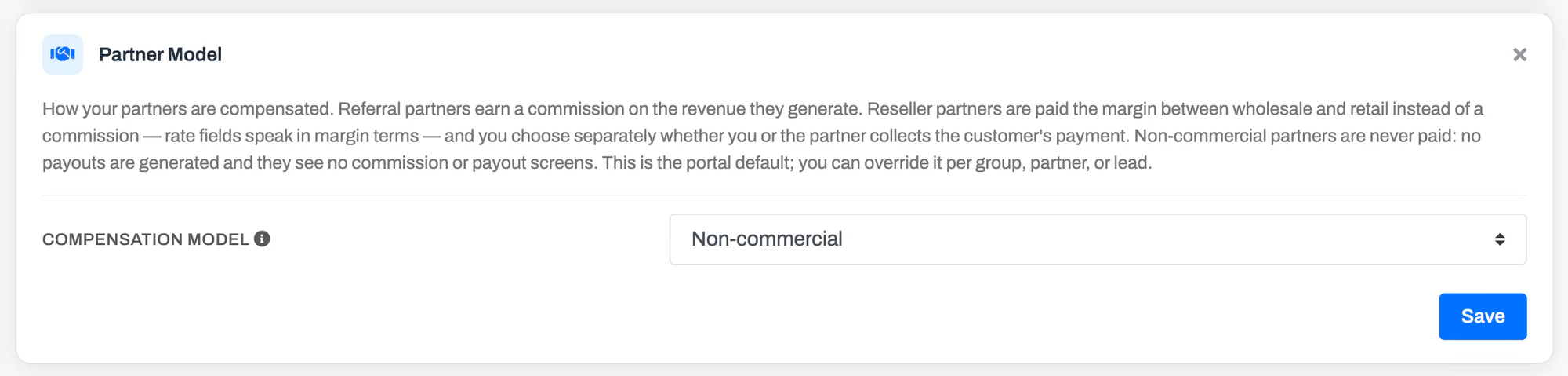
This makes non-commercial the default for every partner. You can still set individual groups or partners to Referral or Reseller. Choosing Non-commercial as the portal default clears any reseller settings on the card, just as choosing Referral does.
For a partner group
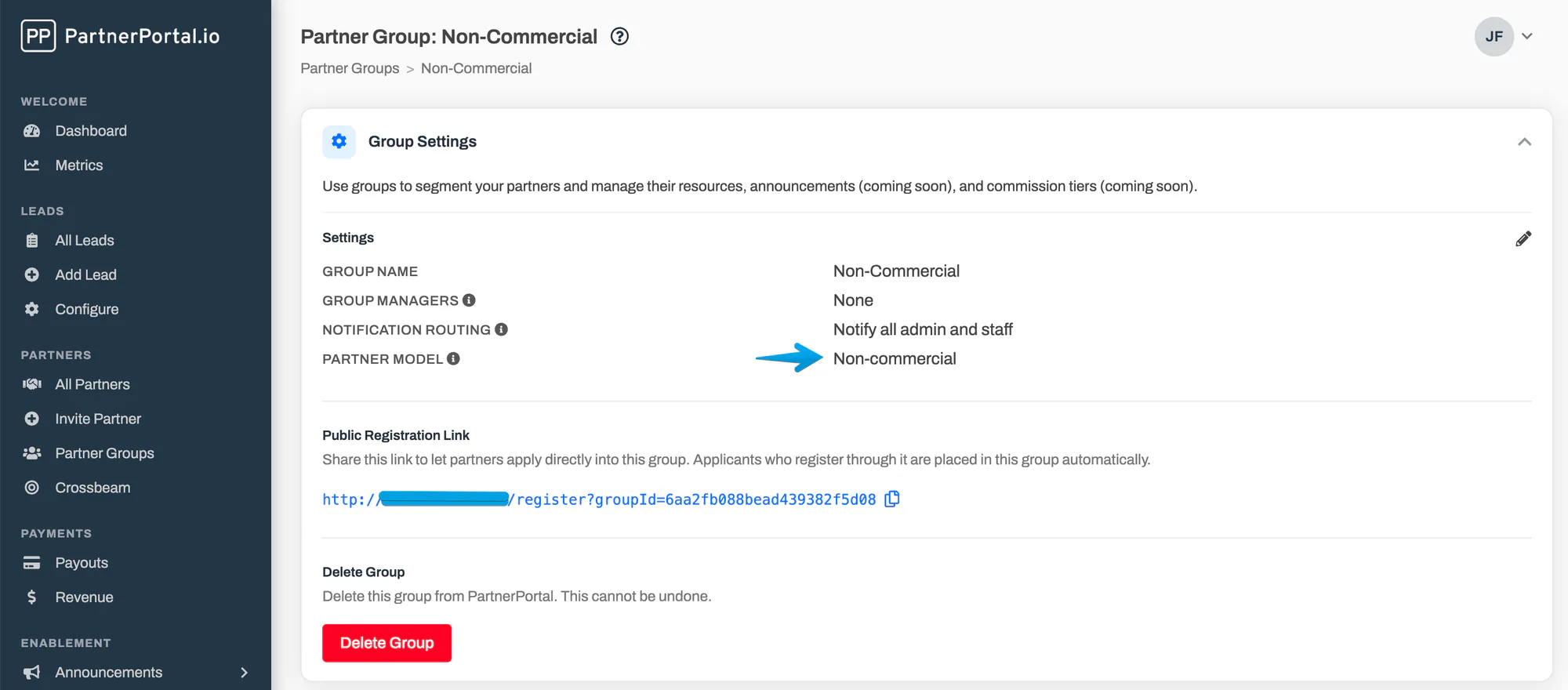
Section titled “For a partner group”Set the group’s Partner Model field to Non-commercial from the group’s settings. This is the usual way to set up a technology-partner group or an internal-training group. See Partner model for a group.
For one partner
Section titled “For one partner”Set the Partner Model field on the partner’s record to Non-commercial. This overrides their group and your portal default. See Partner models.
For one lead
Section titled “For one lead”Set the Partner Model on the lead’s Commission settings card. Use Non-commercial to exempt one lead, or Referral to pay one lead under a non-commercial partner. See Override commission settings for one lead.
At the group, partner, and lead levels you can also choose Inherit, which follows the level above it — the current resolved value is shown in parentheses.
Switching a partner to or from non-commercial
Section titled “Switching a partner to or from non-commercial”- Existing payouts stay. Each payout records the model it was created under, so payouts already generated keep their meaning and amounts. Any payouts still awaiting approval remain on your Payouts page; delete them if they should not be paid.
- Skipped periods are not backfilled. If you move a partner back to Referral, PartnerPortal generates payouts from the current period forward. Periods that passed while the partner was non-commercial are not paid retroactively.
- Revenue already captured for the partner’s leads becomes eligible for commission on the next generation run after the switch, because it was never paid. Review it before the run if that is not what you intend.
Frequently asked questions
Section titled “Frequently asked questions”How is this different from disabling the payments interface?
Section titled “How is this different from disabling the payments interface?”Disabling payments turns the money features off for the whole portal and requires you to switch off tiers, commission generation, and any accounting or payment integration first. The non-commercial model does the same thing for one partner, group, or lead, and leaves the rest of your program paying as before. See Disable Payments Interface.
How is this different from hiding the commission cards with Customize Screens?
Section titled “How is this different from hiding the commission cards with Customize Screens?”Customize Screens only changes what a screen shows; commissions are still calculated and payouts still generated behind it. The non-commercial model stops the payouts themselves, and hides the screens as a consequence. Use Customize Screens for things like keeping Close Value away from partners; use Non-commercial for partners who are not paid.
Can a non-commercial partner still submit leads?
Section titled “Can a non-commercial partner still submit leads?”Yes. Lead registration, lead status, comments, files, and CRM sync all work exactly as they do for any other partner. Only the commission, payout, and revenue parts of the lead screen are hidden from them.
Can I invite a non-commercial partner to a SPIFF?
Section titled “Can I invite a non-commercial partner to a SPIFF?”You can, and you can award them a bonus, but they will not see the SPIFF or the award in the portal — the SPIFFs area is hidden for them. If a partner should take part in incentive campaigns, they belong on the referral or reseller model.
Does the partner know they are non-commercial?
Section titled “Does the partner know they are non-commercial?”There is no label or message on their side. They simply see a portal with no commission or payout screens, which for a technology partner or an internal team is the natural experience.
What do my team see on a non-commercial partner’s record?
Section titled “What do my team see on a non-commercial partner’s record?”The Partner Model field with a note that no commissions or payouts are generated, and no Payout Details or Payouts cards. Leads, users, certifications, files, and messages are unchanged.