
How Reseller Partners Work
PartnerPortal supports three ways to compensate partners: referral, reseller, and non-commercial. Referral partners earn a commission on the revenue they generate. Reseller partners are paid the margin — the spread between the wholesale price and the retail price the customer pays — instead of a commission on revenue, and every rate field speaks in margin terms. Separately, you choose who collects the customer’s payment — you or the partner — which changes how the payout behaves. This page explains how the reseller model works, how to turn it on, and exactly what PartnerPortal does and does not handle. For partners who are never paid at all, see How Non-commercial Partners Work.
Referral vs reseller
Section titled “Referral vs reseller”The difference is who earns what, and in what language:
- Referral — the partner sends you business and earns a commission calculated as a percentage of the attributed revenue. Screens speak in commission terms.
- Reseller — the partner resells your product and is paid the margin between wholesale and retail rather than a commission on revenue. Screens and rate fields speak in margin terms. Whether you or the partner collects the customer’s payment is a separate choice — see Who collects the payment.
When a partner is set to the reseller model, PartnerPortal switches the vocabulary they and your team see — “Commission” becomes “Margin”, “Commission Details” becomes “Margin Details”, and so on — so the product matches how a reseller program actually talks.
Turn on the reseller model
Section titled “Turn on the reseller model”The compensation model is a portal-wide default that you can override further down.
Open Portal Setup → Program Details.
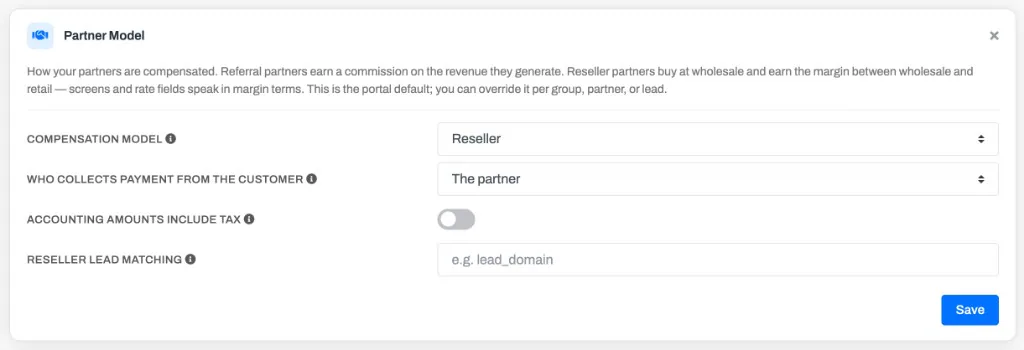
In the Partner Model card at the bottom of the screen, set Compensation model to Reseller.
Choose Who collects payment from the customer — You (your company) or The partner. This changes how payouts behave; see Who collects the payment below.
If the revenue figure your accounting system reports includes tax, turn on Accounting amounts include tax and enter the tax rate. PartnerPortal removes tax before any margin math.
Save your changes.
How margin is calculated
Section titled “How margin is calculated”For a reseller partner, PartnerPortal derives every number it needs from the one figure your accounting system reports plus the margin rate. You do not enter a wholesale price. The payout record lays it out as a receipt you can read top to bottom:
- Gross Revenue — the full amount collected or invoiced, exactly as your accounting system reported it (including any sales tax).
- Sales Tax — the tax portion, removed before any margin math. Zero when the amount was tax-exclusive.
- Net Revenue — gross minus sales tax; the figure the margin is calculated on.
- Margin Rate — the rate you set, shown as a margin %.
- Partner Margin — the margin owed to (or kept by) the partner. The derived wholesale and retail are also shown where they add information.
Working from a customer payment of $10,000 with no tax at a 30% margin on wholesale, Net Revenue is the full $10,000, the derived wholesale is $7,692.31, and the Partner Margin is $2,307.69 — 30% of wholesale (about 23.08% of revenue).
The margin rate you enter as a margin % is stored and paid as its exact commission-percentage equivalent, so the amount a reseller is paid always matches the margin shown on the payout — they can never drift apart.
If the reported amount includes tax, PartnerPortal strips it as Sales Tax first, then runs the same math on Net Revenue.
Who collects the payment
Section titled “Who collects the payment”Under the reseller model you also choose who collects payment from the customer. The two options behave differently:
- You (your company) collect (the default) — your accounting system reports the retail amount the customer paid, and PartnerPortal creates a payout that owes the partner their margin, just like a referral payout. This is the model described above.
- The partner collects — the partner bills the customer directly and keeps the spread between wholesale and retail. You invoice the partner for the wholesale amount, and that invoice is what your accounting system reports. The partner has already earned their margin at the point of sale, so nothing is owed to them. PartnerPortal still tracks the margin for your reporting, but the payout is recorded with a $0 payment amount — this is called a track-only payout.
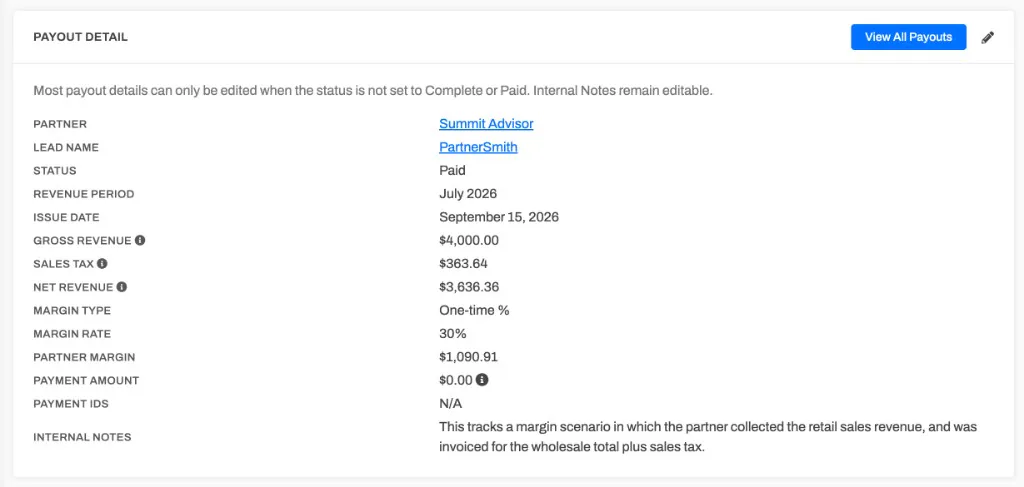
Who-collects is a portal-wide setting on the Partner Model card. The compensation model and rates can still be overridden per group, partner, and lead, but whether the partner collects is set once for the portal.
Reseller lead matching
Section titled “Reseller lead matching”This applies only when the partner collects. Normally PartnerPortal matches captured revenue to a lead through the customer on the accounting record. But when the record is your invoice to the partner, the customer on it is the partner — so that match can’t find the end lead.
To attribute those records, add a metadata field to each Stripe charge holding the lead’s website domain (for example acme.com), then enter that field’s name in Reseller lead matching on the Partner Model card. Metadata matching applies to Stripe records today.
- Records whose domain matches exactly one lead are attributed automatically.
- Records whose domain matches no lead or several leads are kept unmatched for review — PartnerPortal never guesses.
- Records with no metadata value are treated as ordinary, non-partner invoices and are not captured.
- Leave the field blank to keep matching by customer identity (the default).
How reseller revenue records read
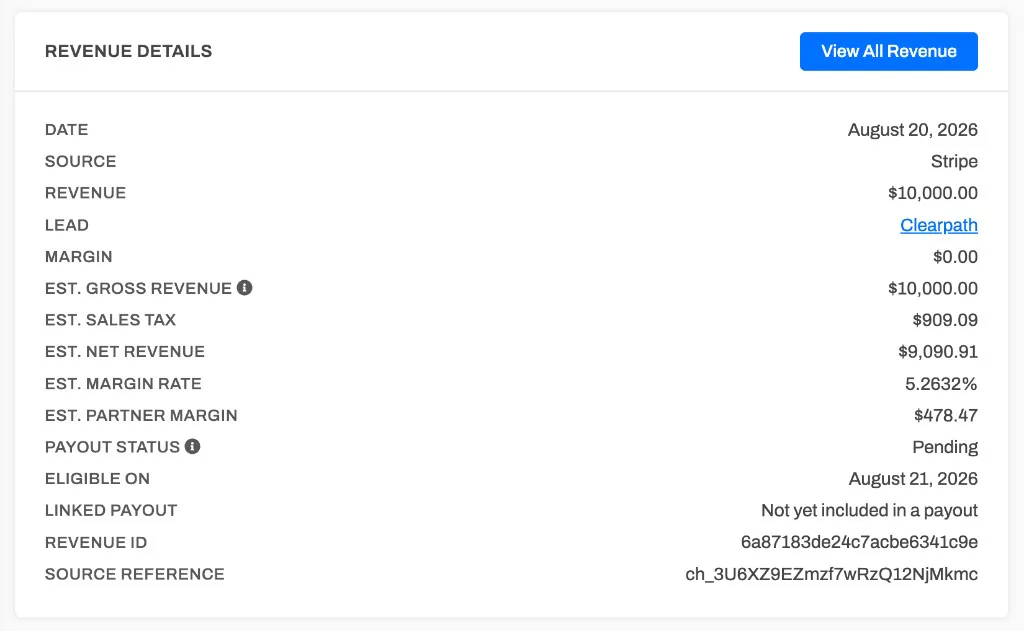
Section titled “How reseller revenue records read”Each captured revenue record (Revenue → a single entry) shows an estimated margin breakdown, so you can see the split before a payout is generated: Est. Gross Revenue, Est. Sales Tax, Est. Net Revenue, Est. Margin Rate, and Est. Partner Margin. The margin rate is fixed on the revenue record when the revenue is captured, so it never drifts; the tax and wholesale/retail split are estimated from your current reseller settings, which is why they are labelled “Est.” Once the revenue is rolled into a payout, that payout is the authoritative record.
Override the model per group, partner, or lead
Section titled “Override the model per group, partner, or lead”The reseller model cascades the same way commission settings do — the most specific setting wins:
- Partner group — set a group to Referral or Reseller from the group’s settings. See Partner model for a group.
- Partner — set an individual partner’s model on their record. See Partner models.
- Lead — set the model for a single lead on the lead’s commission settings.
At the group, partner, and lead levels you can also choose Inherit, which follows the level above it (ultimately the portal default). Each level also offers Non-commercial for partners who are never paid — see How Non-commercial Partners Work.
What PartnerPortal supports, and what it doesn’t
Section titled “What PartnerPortal supports, and what it doesn’t”The reseller model is built around a single margin rate applied to the revenue you actually bill. That design makes the math fully automatic with Stripe and QuickBooks, and it also sets the boundaries:
- Supported — a consistent margin rate for a partner (or tier, or lead), derived from real billed revenue. This works even when the mix of products changes over time, as long as the margin rate stays the same.
- Not supported — per-product or per-SKU margins, product catalogs, and quoting (CPQ). PartnerPortal does not break a deal down by product to compute a blended margin.
- Supported (track-only) — programs where the partner collects the revenue from the customer and keeps the margin. PartnerPortal tracks the margin and records a $0 payout; see Who collects the payment.
- Payouts — when you collect, reseller payouts move money the same way referral payouts do: PartnerPortal can send them through the PayPal integration, or the record is for tracking and you pay the partner outside the platform. When the partner collects, payouts are track-only ($0 owed) and never move money.
Frequently asked questions
Section titled “Frequently asked questions”Do I need to enter a wholesale price for each deal?
Section titled “Do I need to enter a wholesale price for each deal?”No. PartnerPortal derives wholesale, retail, and margin from the revenue your accounting system reports and the margin rate on the partner, tier, or lead. There is no separate wholesale field to maintain.
Can different partners have different margins?
Section titled “Can different partners have different margins?”Yes. Because margin rates live in the same place as commission rates, you can set them by tier, by partner, or by lead. Each is entered and shown as a margin % under the reseller model.
Can a partner resell at different margins for different products?
Section titled “Can a partner resell at different margins for different products?”No. The reseller model uses one margin rate for a partner, not a per-product rate. It works when a partner’s margin is consistent across what they sell; it does not compute a blended margin from a mix of products at different rates.
What if the revenue amount includes tax?
Section titled “What if the revenue amount includes tax?”Turn on Accounting amounts include tax in the Partner Model card and enter the tax rate. PartnerPortal removes tax before calculating wholesale and margin.
What if my partner collects the money from the customer instead of me?
Section titled “What if my partner collects the money from the customer instead of me?”That’s supported. Set Who collects payment from the customer to The partner on the Partner Model card. Your partner bills the customer and keeps the margin between wholesale and retail, and you invoice them for the wholesale amount. PartnerPortal tracks the margin for your reporting but records the payout with a $0 payment amount, because your partner has already earned it — this is a track-only payout. See Who collects the payment.
Why does a reseller payout show a $0 payment amount?
Section titled “Why does a reseller payout show a $0 payment amount?”When the partner collects the payment, they keep their margin at the point of sale, so nothing is owed to them through PartnerPortal. The payout still records and tracks the margin for your reporting, but the Payment Amount is $0 by design. If you expected to pay the partner, check that Who collects payment from the customer is set correctly on the Partner Model card.
Does switching a partner to reseller change their existing payouts?
Section titled “Does switching a partner to reseller change their existing payouts?”No. Each payout records the compensation model it was created under, so payouts already generated keep their original meaning and amounts. Only payouts created after the change use the new model.