
How to Manage Leads
The Leads area is where your team reviews every lead partners submit, moves each one through your pipeline, and records the revenue and commissions behind it. This page walks through the leads list and each card on the lead detail screen.
View and Filter Leads
Section titled “View and Filter Leads”The All Leads tab lists every current and past lead submitted by any partner, or entered by your team on a partner’s behalf. You can filter by:
- Status — the lead’s status within the portal. If duplicate lead detection is on, this filter also has a Duplicates option that shows only leads flagged as possible duplicates. See How Duplicate Lead Detection Works.
- Lead Name — or company name
- Partner — who submitted the lead
- Submission Date
- Type — options depend on your setup
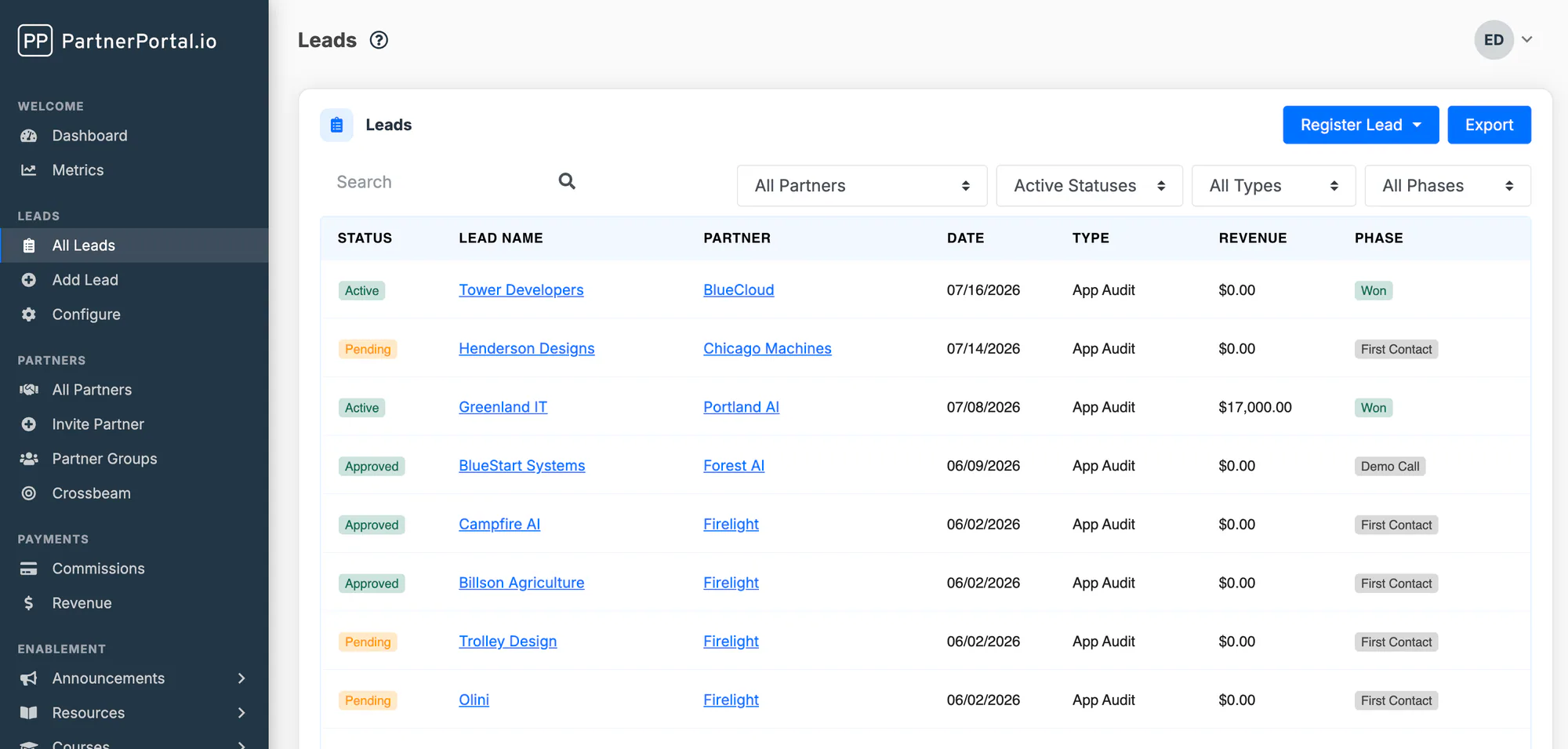
Click any lead to open its detail screen.
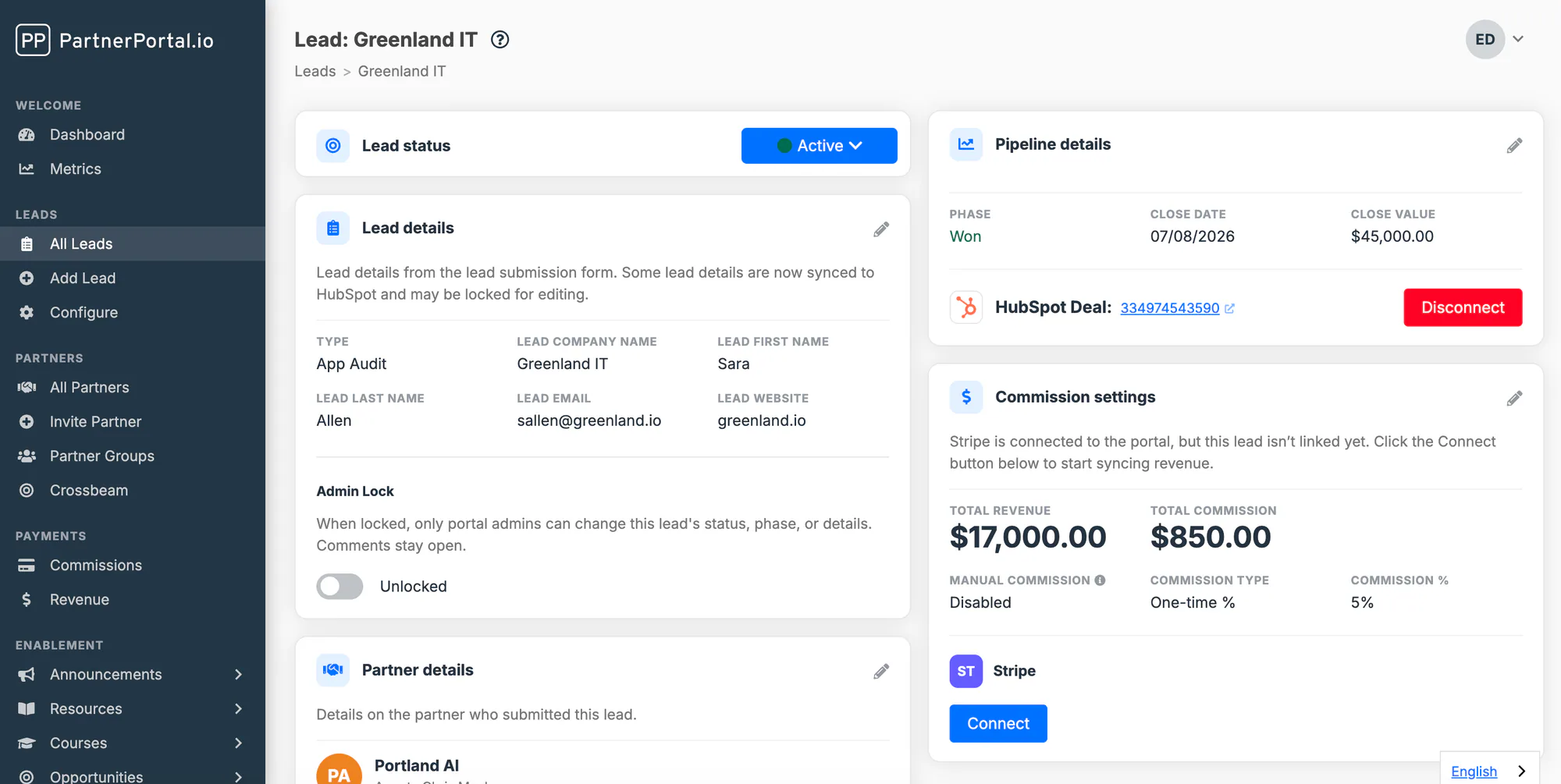
Approve, Decline, or Update Lead Status
Section titled “Approve, Decline, or Update Lead Status”Every submitted lead starts in Pending and waits for your team to review it. The Lead status card at the top of the lead detail screen holds the status dropdown.
Open Leads and filter to Pending, or open the pending leads section on your dashboard.
Open the lead you want to review.
In the Lead status dropdown, choose the new status.
The statuses are:
- Pending: submitted and waiting for review.
- Approved: accepted by your team. If your CRM is connected, approving a lead is also when PartnerPortal offers to create or link the CRM deal. See Approving a lead: your sync options.
- Active: the lead is being worked.
- Declined: not accepted. You can only decline a lead while it is still Pending. You can add a reason, which is posted as a comment on the lead where the partner can see it.
- Expired: the lead is no longer live. Leads can expire automatically after a period of inactivity. See Automatic Lead Expiration.
Partners are notified by email whenever a lead’s status changes.
If a lead is flagged as a possible duplicate of another open lead, a Possible duplicate card appears below the Lead status card with the other leads and your options for resolving it. Flagged leads are never auto-approved. See How Duplicate Lead Detection Works.
Edit Lead Details
Section titled “Edit Lead Details”The Lead details card shows everything the partner entered on the lead registration form. Click the pencil icon to make the fields editable, change what you need, then click Submit.
The fields on this card come from your lead registration form. Every field you add to the form also becomes a field on each lead, so it appears here and can be edited by your team. See How to Customize the Lead Registration Form.
If the lead is connected to your CRM, fields that your CRM owns are locked here and update from the CRM instead. See Sync direction and two-way sync.
Change the Partner or Agent on a Lead
Section titled “Change the Partner or Agent on a Lead”The Partner details card shows which partner company submitted the lead and which person at that partner is the agent on it. Click the pencil icon on that card to reassign the lead to a different partner or agent, then submit.
Reassigning a lead moves it, along with its comments and files, to the new partner’s view. It does not change the lead’s status.
Update Pipeline Details
Section titled “Update Pipeline Details”The Pipeline details card tracks where the deal stands:
- Phase — the deal stage, from your configured lead phases. See How to Customize Lead Phases.
- Close Date
- Close Value — the deal amount, which becomes the revenue figure when a commission is generated on Closed Won.
If partners shouldn’t see deal amounts, you can hide Close Value from them portal-wide or per partner group. See Sensitive fields.
Click the pencil icon to edit these, then submit. A lead must be Approved or Active before its pipeline details can be edited.
When your CRM is connected, this card also shows whether the lead is linked to a CRM deal, with a Connect or Disconnect button. Connected leads take their pipeline details from the CRM. See Connecting a lead to your CRM later.
Override Commission Settings for One Lead
Section titled “Override Commission Settings for One Lead”On portals with payments enabled, the Commission settings card shows the total revenue and total commission for the lead, and the commission terms that apply to it. A new lead starts with the partner’s current commission settings.
To give one lead its own terms, click the pencil icon, turn on Manual Commission, and set the commission type, rate or fixed amount, and duration for that lead only. On reseller portals the rate is entered as a margin, and you can also set a fixed wholesale amount for the lead.
The card’s Partner Model field can also change how this one lead is compensated: set it to Referral to pay out a single deal for a non-commercial partner, or to Non-commercial to exempt one lead from payouts. Inherit follows the partner’s own setting.
For the full override hierarchy, see Override by Lead. For how each value is calculated, see Understanding Payments.
If you use Stripe, QuickBooks, or Xero for revenue, this card is also where you connect the lead to the matching customer record. See Tracking Revenue.
Add a Payout for a Lead
Section titled “Add a Payout for a Lead”The Payouts card lists every commission payout created for the lead, with its status and amount.
To record a payout by hand, the lead’s phase must be Closed Won. Then click Add Payout, enter the payout details, and save. PartnerPortal calculates the commission from the lead’s commission settings. Use Export on the same card to download the lead’s payouts.
For when to add payouts manually versus generating them automatically, see Managing Commissions. For the full payment workflow, see Paying Commissions.
Review Revenue Matched to a Lead
Section titled “Review Revenue Matched to a Lead”On portals using in-app revenue capture, a Revenue card lists the revenue records matched to the lead, with actions to confirm, assign, or unassign each one. See Review and correct captured revenue.
Share Files on a Lead
Section titled “Share Files on a Lead”The Files card lets your team and the partner attach documents to a lead, such as proposals, contracts, quotes, or signed paperwork.
On the lead detail screen, click Upload Files on the Files card.
Drag files in or click to choose them. You can add an optional title and description for each file.
Choose whether each file is Visible to partner. Files you upload are hidden from the partner until you turn this on.
Click Upload.
Once uploaded, you can:
- click a file to open or download it
- edit its title and description with the pencil icon
- switch Visible to Partner on or off for files your team uploaded
- delete a file with the trash icon
Partners can upload files to their own leads too. A partner’s uploads are always visible to that partner and can’t be hidden from them; delete the file if it should no longer be shared. Every file shows who uploaded it and their organization, so you can tell your team’s files from the partner’s at a glance.
Comment on a Lead
Section titled “Comment on a Lead”The Comments card is a shared thread between your team and the partner. Anything posted here is visible to both sides, and the other side is notified by email. Use it for questions about the lead, status updates, or next steps.
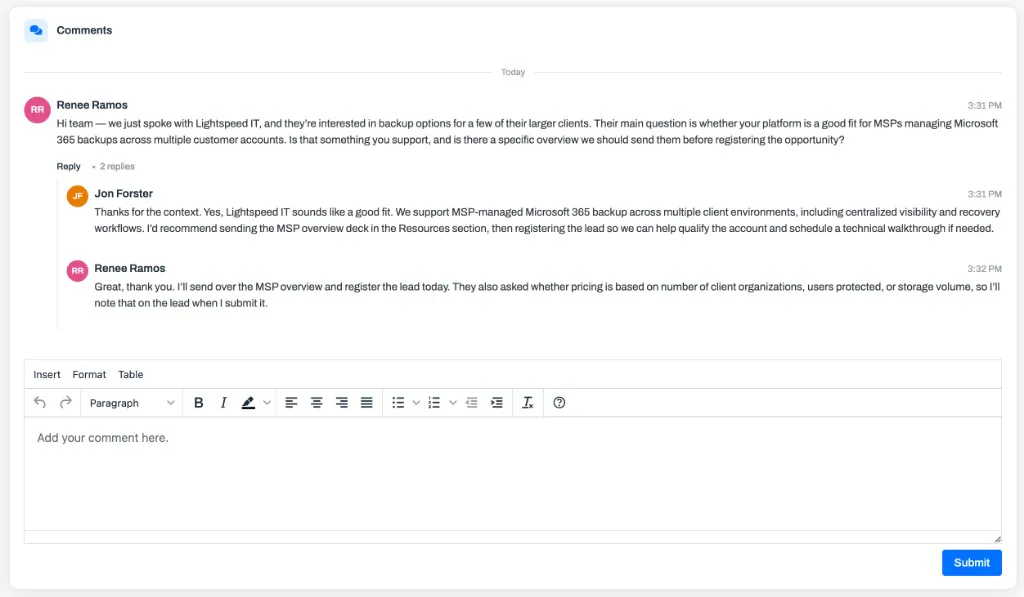
You can reply to any comment to keep a back-and-forth grouped under the message that started it. Select Reply under a comment, and replies collapse behind an N replies toggle so long threads stay easy to scan.
You can also edit or delete a comment after posting it. Anyone on your team can edit a comment your team wrote and delete any comment on the thread, including a partner’s. Partners can edit and delete comments written by anyone in their organization, but never yours. Edited comments show an (edited) mark. Deleting a comment that has replies leaves a “This message was deleted” placeholder so the replies keep their place; a comment with no replies is removed outright.
Lock a Lead
Section titled “Lock a Lead”Portal owners and admins can turn on Admin Lock on the Lead details card. While a lead is locked, nobody can change its status, phase, details, commission settings, or files until an admin unlocks it. Comments stay open. Use it to freeze a lead that is under review or in dispute.
Delete a Lead
Section titled “Delete a Lead”A lead can be deleted from the Lead details card while it is Pending or Declined. Leads that have payouts or matched revenue can’t be deleted. Deleting a lead removes its comments and files and disconnects any linked CRM deal in PartnerPortal, but it does not delete the deal in your CRM.
Frequently asked questions
Section titled “Frequently asked questions”Can partners edit a lead after submitting it?
Section titled “Can partners edit a lead after submitting it?”No, except for pipeline fields on partners with Allow partner to update pipeline status turned on. Partners can always add comments and upload files.
Why can’t I edit the pipeline details on a lead?
Section titled “Why can’t I edit the pipeline details on a lead?”The lead is either still Pending (approve it first), locked by an admin, or connected to your CRM, in which case the CRM owns those fields.
Can I hide a file the partner uploaded?
Section titled “Can I hide a file the partner uploaded?”No. Files a partner uploads are always visible to that partner. Delete the file if it should no longer be on the lead.
Why is the Add Payout button disabled?
Section titled “Why is the Add Payout button disabled?”Payouts can only be added once the lead’s phase is Closed Won, and only by users with permission to manage payments.