
Developer Documentation
PartnerPortal is built to connect to the rest of your stack. Whether you want to push leads in, pull data out, or get notified the moment something changes, there is a path that fits how much you want to build.
This page is the starting point. It explains the options at a high level and points you to the right guide for each one.
What you can do
Section titled “What you can do”- Send leads into PartnerPortal by pushing them in from your website, marketing automation, or another tool
- Pull data out by fetching leads, account information, and your portal’s field schema on demand
- Get notified when leads change by receiving a real-time push when a lead is created, updated, or deleted
- Automate no-code workflows by connecting PartnerPortal to other apps through Zapier
Three ways to integrate
Section titled “Three ways to integrate”Pick the path that matches how much engineering effort you want to spend.
| Path | Best for | What it is |
|---|---|---|
| Zapier | No-code | Connect PartnerPortal to other apps through Zapier’s visual builder without writing code. |
| REST API | Build-it-yourself | Standard JSON endpoints to create, read, and update leads, and to discover your portal’s field schema. |
| Webhooks | Build-it-yourself, real-time | Signed notifications that tell your system the moment a lead changes, so you do not have to poll constantly. |
Most custom integrations use the REST API and Webhooks together. Webhooks tell you when something happened; the REST API is how you fetch the actual data. Webhooks on their own are a notification mechanism, not a full data feed.
Zapier, the no-code option
Section titled “Zapier, the no-code option”If you would rather not write code, start with our Zapier integration. It can:
- create a lead in PartnerPortal when something happens in another tool
- trigger an action elsewhere when a lead is created or updated in your portal
Your portal’s custom fields can flow into that Zapier setup, so you do not need to build a custom field-mapping layer yourself.
Start with our Zapier guide, or go directly to PartnerPortal.io on Zapier.
REST API, the foundation
Section titled “REST API, the foundation”The REST API is how you read and write data programmatically. With it you can:
- create leads, update them, fetch a single lead, or list leads for backfills and reconciliation
- discover your portal’s lead schema, including custom fields and picklists, so your integration always maps the right fields
It uses OAuth 2.0 access tokens and returns standard JSON. If your plan includes API access, you can generate your own API keys directly in your portal.
Start with the Public API Guide. For the full endpoint-by-endpoint reference, use developer.partnerportal.io/docs.
Webhooks, real-time notifications
Section titled “Webhooks, real-time notifications”Instead of polling the API asking “anything new?”, give us a URL and we will POST to it the moment a relevant event happens. A typical flow:
- You subscribe to a topic such as
lead/createand give us your URL. - A lead changes in your portal.
- We POST a small signed notification such as
{ id, topic, timestamp }to your URL. - Your server verifies the signature, then calls the REST API to fetch the full lead by
id.
Webhooks cover lead/create, lead/update, and lead/delete today.
Start with the Webhooks Guide.
How to get access
Section titled “How to get access”How you get credentials depends on your plan:
- If your plan includes API access, a portal admin can generate API keys directly in the portal under Portal Setup → Other → Developer / API Keys
- If you do not see the Developer / API Keys section, API access is not included on your current plan, or you do not have admin permissions
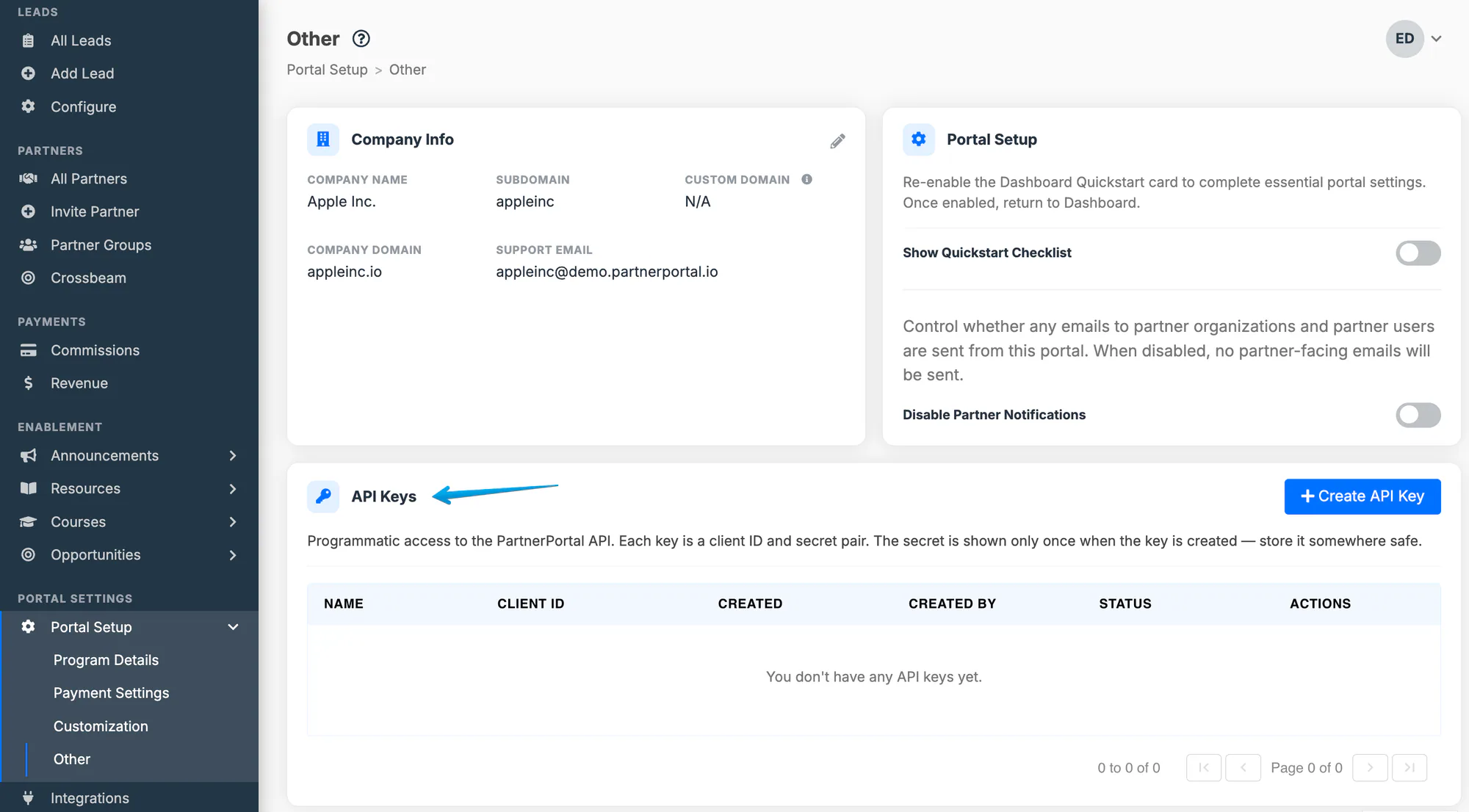
Either way, you will end up with:
- a Client ID and Client Secret
- an Audience that identifies our API
- your Company ID, which identifies your portal in API requests
Treat your Client Secret like a password. If a key is ever exposed, revoke it from the Developer / API Keys page and create a new one.
The same credentials work for both the REST API and Webhooks.
Where to go next
Section titled “Where to go next”| You want to… | Go to |
|---|---|
| Generate a token and make your first API call | Public API Guide |
| Subscribe to and verify webhooks | Webhooks Guide |
| See every endpoint, request, and response shape | developer.partnerportal.io/docs |
| Connect PartnerPortal with no code | Zapier guide |
Need help?
Section titled “Need help?”For auth errors, unexpected responses, or design questions such as whether webhooks or polling fit your use case better, contact [email protected].