
Partner LMS: How to Choose a Partner Learning Management System
A partner LMS is a learning management system built for external partners. What it must do, where it can live (inside your PRM, standalone, or an employee LMS), the 2026 landscape by segment, and how to roll one out.
Written by the team at PartnerPortal — PRM software used to run B2B partner and channel programs.
A partner LMS — a partner learning management system — is a learning platform built to train the people who sell, resell, implement, or refer your product but don’t work for you. Those people work for your channel partners: resellers, referral partners, distributors, agencies, and technology partners. It organizes their training into courses, controls which partner organizations see which content, tests and certifies what they’ve learned, and reports completion per partner company and per user. It’s the training layer of a partner program, and increasingly it’s built into the PRM (partner relationship management) platform that runs the rest of the program rather than bought separately.
This guide is for the person who has to decide how to train partners. It covers what a partner LMS needs to do, the three places it can live, which tools occupy each segment in 2026, how to choose, how to roll one out in a month, and how to tell whether it is working. It is a companion to our guide to partner training software, which covers the training itself: what to teach partners and how to organize it. This page is about the system.
Full disclosure: PartnerPortal publishes this page. PartnerPortal is a PRM with a built-in partner LMS, so we compete with some of the tools named below. We have tried to make this a useful map rather than a funnel. The trade-offs are described as they are, and we say where another kind of tool is the better fit.
TL;DR:
- A partner LMS trains learners you can’t mandate, and that shapes everything else: access is scoped by partner company, motivation comes from the program rather than from HR, and the training has to live where partners already go.
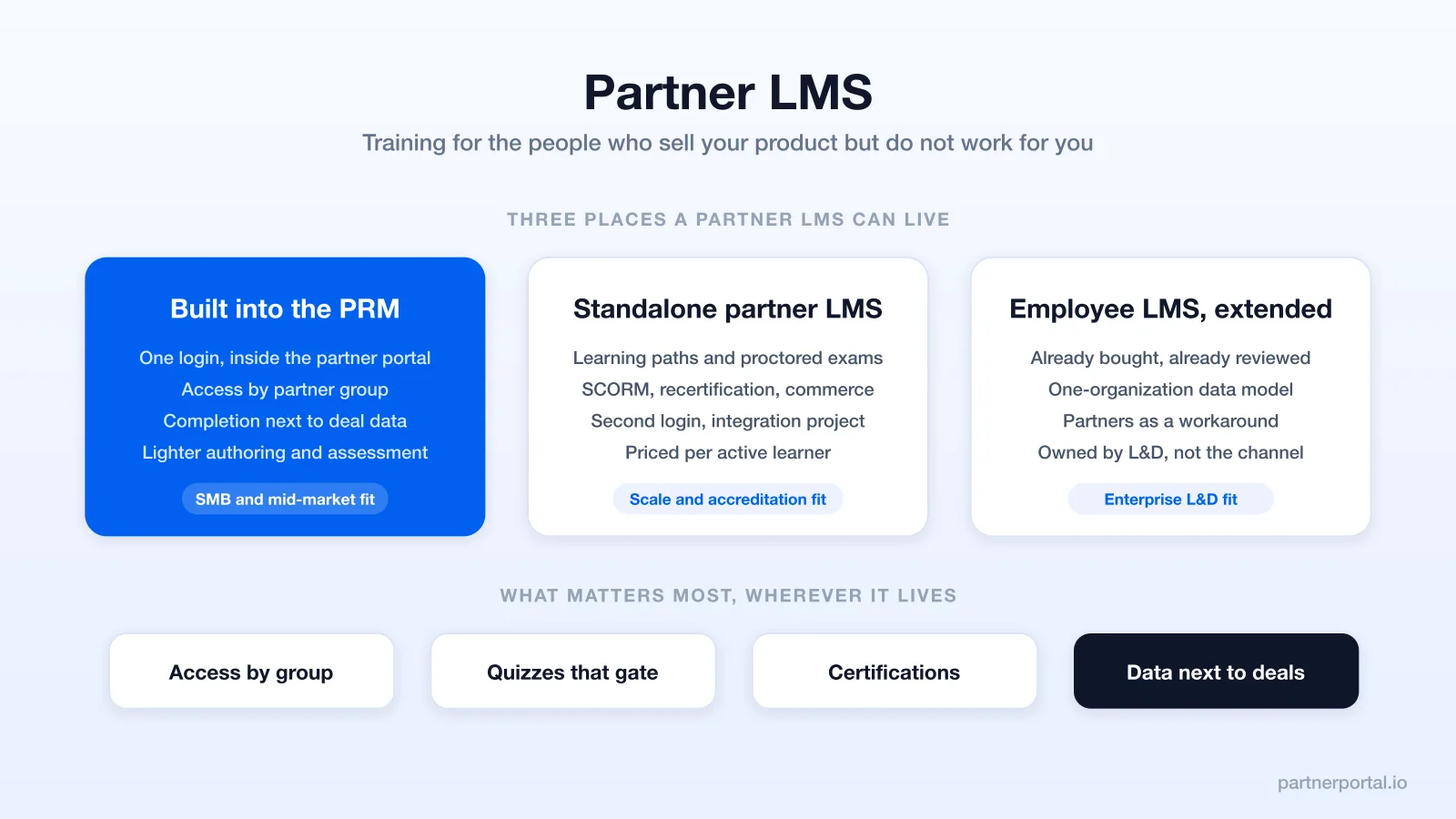
- There are three places it can live. Built into your PRM, a standalone partner- or customer-education LMS, or your employee LMS extended to outside learners. Each suits a different kind of program.
- A few capabilities matter most: access by partner group, quizzes with a pass mark, certifications tied to program benefits, and completion data that sits next to deal data.
- Certifications change behavior when they unlock something — a higher tier, a better rate, a directory listing, a new right. A credential that changes nothing gets ignored.
- A second login costs adoption. Put the first course one click from deal registration.
What is a partner LMS?
A learning management system is software that hosts training content, delivers it to learners, and records what each learner has done. A partner learning management system is one built for a particular kind of learner: someone who works for another company.
That audience changes the product. An employee LMS has one tenant: your company. Its learners are in your HR system, report to a manager who can assign them training, and can be told that completion is a condition of employment. A partner LMS serves dozens or hundreds of independent organizations at once, each with its own users who come and go without telling you, its own reasons for being in your program, and its own view of how much of your training is worth the time. You can’t assign training to a reseller’s sales team the way you assign it to your own — you can only make it findable, short, and worth completing.
A partner LMS does the same core jobs as any LMS: courses, lessons, progress, assessment, certification, reporting. It adds three things a general LMS tends to lack or bolt on:
- Partner-scoped access. Training is gated by partner organization, partner group, or partner tier, not by department. A reseller sees reseller training. A referral partner sees the short version. A new partner sees onboarding and nothing else until they finish it.
- Per-organization reporting. You need to know which people completed a course. You also need to know which partner companies are trained, and which have nobody certified on staff.
- A connection to the rest of the partner relationship. Training status should mean something elsewhere in the program. A certification unlocks a tier. A completed onboarding course unlocks deal registration. Trained partners can be compared with untrained ones on partner-sourced revenue.
The same thing goes by several names: partner training LMS, channel partner training platform, partner education platform, extended-enterprise LMS (the employee-LMS vendors’ term for external audiences), or simply “courses” inside a PRM. They all describe one job — training people outside your company so they can sell or support your product well.
What a partner LMS is not. It isn’t a resource library — a folder of decks and PDFs has no ordering, no completion, and no assessment, so it’s reference material rather than training. It isn’t a sales-enablement content tool, which helps your own reps find the right asset in the moment. And it isn’t an employee LMS with a guest login, which just gives partners access to a system whose data model, assignments, and incentives were designed for someone else.
Why partner training needs its own system
It’s tempting to treat partner training as employee training with a different audience. The reasons it doesn’t work are structural.
You can’t mandate it. Employee training can be required, but partner training can only be invited. A reseller’s rep who hasn’t finished your product course will still sell your product, and there’s no HR process to stop them. The system has to work with that, which means short courses, obvious value, and a credential worth having because of what it unlocks.
The learners belong to many organizations. A partner LMS is effectively multi-tenant: each partner company has its own users, its own informal admin, and its own training status. The questions you end up asking are organizational — which partners have a certified rep, and which have none? Employee LMSs can usually tell you “which people,” but they often struggle with “which companies.”
Identity and access are messier. Partners shouldn’t have accounts in your internal systems. They need partner-scoped identity, ideally the same login they use for your partner portal, and access that follows their partner group and tier automatically and ends cleanly when the partner relationship does.
The goal is revenue, not compliance. Employee training is often about policy: harassment training, security awareness, process certification. Partner training is about making an outside salesperson competent and confident with your product in front of a customer. The content changes with it — positioning, demo, objection handling, pricing, how to register a deal — and so does the measure of success: did trained partners register more deals? Partners’ tolerance for length is also far lower.
It has to sit next to the work. Partners also register deals, check commissions, download the latest battle card, and read your announcements, and they do all of that in your partner portal. Training that lives in a separate system they rarely visit tends to get ignored, while training one click from the deal registration form has a much better chance, because the partner is already there and already motivated.
| Employee LMS | Partner LMS | |
|---|---|---|
| Learners | Your employees, one organization | Staff of many independent partner companies |
| Who assigns training | HR, managers, compliance | Nobody can — the program has to motivate it |
| Access model | Department, role, manager | Partner organization, group, tier |
| Identity | Corporate SSO, HRIS | Partner-portal login, partner-scoped |
| Primary goal | Compliance, skills, onboarding | Partners who can sell and support the product |
| Reporting unit | The person | The partner company, then the person |
| Success metric | Completion rate | Trained partners producing more than untrained ones |
| Where it lives | A dedicated learning system | Ideally, inside the partner portal |
The three places a partner LMS can live
Partner training setups fall into three architectures. The right one depends on your program’s size, the depth of assessment you need, what you already own, and how much adoption risk you can absorb. These are rough categories. Several tools straddle them.
1. Built into the PRM
Training lives inside the partner portal, as a feature of the platform that runs deal registration, resources, and commissions. Partners log in once and find courses next to everything else.
Strengths. Adoption is much easier. There is no second system, no second invitation, no second password. Access control already exists, because the partner groups that gate resources also gate courses. Completion and certification data live with partner data, so “who is trained” sits next to “who is producing” without an integration project. There is no second bill and no second vendor.
Limits. Authoring and assessment are lighter than in dedicated learning platforms. Among the PRMs reviewed below, built-in LMSs generally support rich lessons and multiple-choice quizzes. Graded free-text assessments, proctored exams, and branching learning paths are rare. SCORM and xAPI import is uncommon outside the enterprise PRMs. Learning analytics are usually per-course and per-partner rather than full dashboards. If training is a product you sell, a PRM is not designed for that.
Best fit. SMB and mid-market programs, roughly ten to a few hundred partners, where the job is to get partners competent quickly and prove it with a credential, and where a second login would cost more adoption than any feature could buy back.
2. A standalone partner- or customer-education LMS
A dedicated learning platform built for external audiences: customers, partners, or both. The category grew out of customer education, meaning teaching the users of a software product. Most vendors serve partners as a second audience with the same machinery.
Strengths. This is the category built for depth: structured learning paths with prerequisites, graded and proctored assessments, SCORM and xAPI content, recertification workflows with expiry, multi-language delivery, learner communities, and detailed analytics. If you’re certifying hundreds of implementation partners to a defensible standard, or selling training, this is the category designed for it.
Limits. It’s a second system, so partners get another login and another place to go. You get an integration project to push completion and certification status into your PRM and CRM, or you accept that training data lives apart from deal data. Pricing is typically per active learner and quote-based. It commonly reaches five figures per year before add-ons such as content syndication or data connectors. Implementation takes weeks.
Best fit. Programs with hundreds or thousands of partners, formal accreditation requirements, existing SCORM libraries, or training as a revenue line.
3. An employee LMS extended to partners
You already pay for a corporate LMS. It offers an “extended enterprise” option: a separate branded portal for external learners, often sold per additional tenant or domain.
Strengths. The procurement and security review are already done, and the authoring tools are usually mature. For a large company with an L&D team and existing content, reusing the platform can be the path of least resistance.
Limits. The data model still assumes one organization. Partner companies become a workaround: a branch, a group, a tenant. Per-organization reporting is often an afterthought. Identity is the sticking point. Partners either get accounts in a system designed for employees, or a thinner external portal with fewer features. The adoption problem is the same as option 2, with less partner-specific design to offset it.
Best fit. Large companies with an L&D function, an existing LMS with a mature extended-enterprise module, and a partner program big enough that the L&D team will own partner training as a workstream.
Which architecture, at a glance
| Your situation | Likely fit |
|---|---|
| Under roughly 50 partners, first training program | Built into the PRM |
| 50–500 partners, certifications tied to tiers | Built into the PRM, or a partner-education LMS if assessments must be graded or proctored |
| Hundreds of implementation partners certified to a defensible standard | Partner-education LMS |
| Existing SCORM library you must reuse | Partner-education LMS, or an enterprise PRM with SCORM support |
| Training is a product you sell | Partner- or customer-education LMS with commerce |
| Large company with an L&D team and a corporate LMS in place | Employee LMS extended, or a partner-education LMS if L&D will not own partners |
| Partners rarely log into anything you run | Built into the PRM. Fix adoption first. |
These are starting points, not verdicts: a 40-partner program with a regulatory certification requirement belongs in row three, while a 500-partner referral program with no assessment needs belongs in row one.
What a partner LMS must do
The capability list below is grouped and graded. Table stakes means any serious option has it. Worth paying for means it changes outcomes for mid-sized programs. Enterprise-only means it matters at scale or under formal accreditation, and usually not before.
Content and courses
- Courses made of ordered lessons. Table stakes. A course is a sequence of lessons, each one a unit of content, and without ordering there’s no path and no sense of progress.
- Rich lessons. Table stakes. Text, embedded video, images, links into the product, and downloadable attachments in one lesson.
- Content reuse. Worth paying for. The same lesson should be usable in two courses. The same asset should be both a lesson and a resource in your library without duplication.
- Authoring speed. Worth paying for. If building a lesson takes longer than recording the walkthrough it contains, the system will fall behind the product. AI-assisted drafting from existing documents is now offered by several dedicated platforms and some PRMs.
- SCORM / xAPI import. Enterprise-only. Needed to run courseware authored elsewhere. Irrelevant for programs that author their own short lessons.
Access and segmentation
- Access by partner group. Table stakes. Reseller training for resellers. Referral training for referral partners. Onboarding for new partners. Nothing leaking across.
- Access by individual partner. Worth paying for. For the strategic partner who needs a custom course, without creating a group of one.
- Access by tier. Worth paying for. Advanced courses as a benefit of reaching a tier, or a prerequisite for the next one.
- Separate branded portals per audience. Enterprise-only. Relevant when training customers and partners in one system with different branding. Unnecessary when training already lives inside your partner portal.
Assessment
- Quizzes with a pass mark. Table stakes once you want completion to mean something. A lesson a partner can only complete by passing is a different signal from one they can mark complete.
- Attempt limits, shuffled answers, no answer reveal. Worth paying for. Small design choices that keep a quiz an honest check rather than a form to click through.
- Question types beyond multiple choice. Enterprise-only. Free-text grading, scenario branching, and proctored exams belong to accreditation programs, not product onboarding.
- Timed assessments. Enterprise-only.
Certification
- Automatic award on completion. Table stakes. Finish the required courses, hold the credential, with no admin in the loop.
- Manual award. Worth paying for. For the workshop, the shadowed deal, or the assessment that happens outside the system.
- Person-held credentials with organization roll-up. Worth paying for. The credential belongs to the individual, and the partner company shows as certified while someone active holds it. We recommend this model, though some systems certify the company instead.
- Badges and shareable certificates. Worth paying for. A visible badge in the partner’s portal view is a steady nudge toward completion.
- Expiry and recertification. Enterprise-only, with a caveat. If your product changes fast, a certification earned two years ago is misleading. You may want expiry sooner than your partner count suggests.
- Program consequences. Table stakes for the program, not the tool. The certification should unlock a tier, a rate, a right, or a listing. See the next section.
Tracking and reporting
- Progress and completion per user. Table stakes.
- Completion per partner organization. Table stakes for a partner LMS. Often missing in employee LMSs.
- Lesson-level engagement. Worth paying for. Who viewed what, when, and how far they got tells you which lessons are dead and where partners stall.
- Export and API access. Worth paying for. You will eventually want training status in a spreadsheet, a BI tool, or your CRM.
- Learning analytics dashboards. Enterprise-only.
Integration
- Lives in, or single-signs-on to, the partner portal. Table stakes. A second credential costs completion.
- Training status visible on the partner record. Worth paying for. The partner manager should see certifications and completion next to deals and payouts without switching systems.
- Sync to the CRM. Worth paying for at mid-size, table stakes at enterprise. Certification as a field on the partner account lets sales ops route and report on it.
- Webhooks and API. Enterprise-only in practice. Useful for anyone automating “certified, therefore tier upgrade” outside the PRM.
Learner experience
- No second login. Table stakes. Repeated because it does the most for adoption.
- Progress persistence and resume. Table stakes.
- Works on a phone. Worth paying for. Partner reps watch training between meetings.
- Shareable lesson links. Worth paying for. “Watch this one lesson” gets more completion than “go do the course.”
- Multi-language delivery. Enterprise-only, unless your channel is international from day one.
Certifications: what turns courses into a program
Courses teach partners something. Certifications give them a reason to finish, and what separates the two is consequence. A completed course is just a fact about the past, whereas a certification is a status you can require, display, and reward. Programs that build the credential into the partner program tend to see partners pursue it without being asked.
Four design decisions matter.
Who holds it. We recommend that the credential belong to the person who earned it, with the partner organization shown as certified while at least one active user holds it. When the only certified rep at a reseller leaves, that reseller is no longer certified, and your partner manager should know. Systems that certify the company once, permanently, can produce a roster of “certified partners” with nobody trained on staff.
What earns it. Decide whether the certification requires all of a set of courses or any one of them, whether passing a quiz is required or completion is enough, and whether there’s a manual path for training delivered in person. Keep the first certification small. The onboarding course plus one product course is enough to mean “this person can run a first call.”
Whether it expires. For many SMB programs, awards that do not expire are fine for the first year or two. If your product changes materially every quarter, build in expiry, or at least a versioned certification such as “Certified 2026,” before the credential becomes misleading.
What it unlocks. This is the decision that matters most. A certification should be the key to something partners want: a higher partner tier and commission rate, the right to register deals in a segment, a listing in your partner directory, co-marketing funds, or access to advanced training. If holding the certification changes nothing, partners will conclude that earning it changes nothing. Tie the credential to a benefit before launch.
The partner LMS landscape in 2026, by segment
The market is confusing because three different kinds of vendor sell “partner training,” and their products are not comparable on one axis. Below is a segmented map. Within each segment, tools are listed to give you more than one starting point. They are not ranked. Pricing and capabilities were checked against each vendor’s public pages in October 2026. Most are quote-based. Treat ranges as orientation and confirm with the vendor.
PRMs with a built-in partner LMS
Training delivered inside the partner portal, as part of the platform that runs the program. A common choice for programs under a few hundred partners.
| Platform | Training capability | Assessment | Certification | SCORM | Pricing (verified Oct 2026) |
|---|---|---|---|---|---|
| PartnerPortal | Courses of ordered lessons, access by partner group or individual partner, progress and completion per user and per partner org | Quiz lessons with pass mark, attempt limit, shuffled choices, no answer reveal | Automatic or manual award, badge, person-held with org roll-up, can gate partner tiers | No | Included on every plan: free (5 partners), $249/mo (100 partners), $399/mo (unlimited) |
| Introw | Partner LMS with AI course generation from existing documents, partners learn from the partner hub without a separate login, auto-translation into many languages | Passing scores on certifications (assessment mechanics not detailed publicly) | Custom certifications with passing scores, due dates, and auto-enrollment, plus two-way sync to HubSpot/Salesforce | Yes — SCORM and Articulate Rise import | Free Starter (1 partner). Paid Pro/Scale/Enterprise tiers are tier-based on partner count and not publicly priced (quote-based). LMS plan inclusion not stated on the LMS page |
| JourneyBee | LMS add-on module: courses, certifications, enablement paths | Not stated publicly | Yes (module) | Not stated | Platform from $499/mo, unlimited partners. LMS module quoted with the plan |
| Impartner | Partner Training & Certification application: courses, lessons, quizzes, and progress tracking, with dynamic segmentation deciding who gets which training | Quizzes | Certification tracks, shareable badges, auto-expire rules, workflow triggers | Yes | Enterprise, quote-based |
| ZINFI | Learning application in the Enable zone: courses, certifications, and assessments, plus AI-driven certification renewal | Assessments | Yes, with renewal automation | Yes — SCORM, xAPI, cmi5 | Enterprise, quote-based. Packaging of the Learning module not stated |
| Magentrix | Lists partner training (LMS) under partner management | Not stated publicly | Not stated publicly | Not stated | Quote-based (roughly $1,500/mo entry, per earlier research) |
Notes on this segment. Kiflo does not include a built-in LMS. Training there is shared resources or an external system via SSO. PartnerPortal is the only one in this table that publishes full pricing with training included at every tier. That is a positioning choice, not a claim to be the right pick. Its assessment and authoring depth are lighter than Introw’s or the enterprise suites’. Introw’s authoring features, including AI generation and SCORM import, go further than the other modern PRMs reviewed here. It supports HubSpot and Salesforce only. Impartner and ZINFI are the two in this table with SCORM, expiry, and renewal automation, at enterprise cost and implementation effort.
Partner- and customer-education LMSs
Dedicated learning platforms built for external audiences. Most started in customer education and serve partners with the same engine. This is the segment for depth: paths, graded assessment, recertification, commerce.
| Platform | Positioning | Partner-relevant notes | Pricing (verified Oct 2026) |
|---|---|---|---|
| Skilljar (by Gainsight, after folding in Northpass) | Customer and partner training academies | Certification programs with proctored exams, badges, and recertification, native Salesforce, content syndication to customers’ LMSs, learner SSO | Quote-based: annual subscription plus an active-user fee, plus add-ons such as content syndication ($10k) and a data connector (from $25k) |
| Intellum | Customer, partner, and employee education | AI-assisted authoring and management, certifications at scale, SOC 2 Type II | Quote-based |
| Thought Industries | Customer learning, partner enablement | Custom learning portals and Salesforce integration on all tiers, SCORM Connect on Enterprise | Starter / Professional / Enterprise, quote-based |
| LearnUpon | Employee, customer, and association training | Portals for separate audiences, certification and recertification, SCORM and xAPI, HubSpot and Salesforce integrations, SSO | Quote-based, Customer Education from 300 users |
| Docebo | Enterprise learning, extended enterprise | Extended enterprise up to 10 domains on Enterprise, certification tracking, Docebo for Salesforce as a paid add-on | Quote-based on tier and active users, with setup fees scoped in sales |
| Absorb | Enterprise LMS with extended-enterprise use | Multi-portal setups commonly used for partners | Quote-based (lead form only) |
Notes on this segment. These are the tools to evaluate when assessment must be defensible, when you sell training, or when hundreds of partner organizations need their own branded learning space. Expect weeks of implementation, per-learner pricing, and an integration project to get completion data into your PRM and CRM. The adoption risk is the second login. Vendors mitigate it with SSO, and some with embedding. The training still lives apart from deal registration.
General-purpose LMSs commonly used for partners
Broad learning platforms with public pricing. Often chosen by programs that want more than a PRM offers but do not need an enterprise education platform.
| Platform | Partner-relevant notes | Pricing (verified Oct 2026) |
|---|---|---|
| TalentLMS | Branches (independent training portals): 1 on Core, 3 on Grow, 15 on Pro. SCORM 1.2 / Tin Can / cmi5 on all plans, HubSpot integration and SSO on paid plans | Free (5 users), Core $119/mo, Grow $229/mo, Pro $449/mo plus $6 per additional user, Enterprise from 1,000 users |
| Litmos | Partner and channel enablement as a named solution, additional tenants as an add-on, SCORM/xAPI/AICC import, native SCORM authoring, Salesforce AppExchange | Foundation from $8K/yr, Platinum from $15K/yr, Platinum AI by quote |
| Disco | Built for training businesses and cohort programs, SCORM on Organization and above, Slack/Zoom/Stripe/Zapier integrations | Organization roughly $399–$499/mo billed annually, up to 500 members. Enterprise custom |
Notes on this segment. These are capable, affordable, and not partner-specific. “Branches” and “tenants” approximate partner organizations. Per-partner-company reporting and tie-ins to tiers and deal registration are things you build around the LMS, not features of it.
Sales enablement platforms that overlap
Mindtickle, Highspot, and Showpad are built to train and equip your own sales team. Each names partner enablement as a use case. They can make sense when a large company already runs one of them for direct sales and wants partners on the same content and certification machinery. They are quote-based and assume an enablement team to run them. They are rarely the first purchase for a partner program. We have not verified their external-learner specifics beyond the use-case positioning on their public pages.
How to choose a partner LMS
Start from what you already have. Then narrow.
Step 1: Check your PRM. If you run a PRM, find out exactly what training it includes. Courses, quizzes, certifications, per-partner reporting, and whether it is included or an add-on. If it covers the table-stakes list above, use it before buying a second system. The adoption advantage of training inside the portal is hard to buy back with features. If your PRM has no training capability, or only a resource library, move to step 2.
Step 2: Size the assessment problem. Do you need to know a partner learned something, or do you need to prove it to someone else? If you only need to know, a quiz with a pass mark does it, and a PRM-built LMS or a general LMS handles that. If you need to prove it — accreditation, audit, regulation, or a certification customers rely on — that points to a partner-education platform with proctoring and recertification.
Step 3: Count partner organizations, not learners. Fifty partner companies with three reps each is a small program by learner count. It is mid-sized by the measure that matters: organizations to track, segment, and certify. Make sure the tool reports by organization.
Step 4: Decide where completion data needs to end up. If the answer is “on the partner record, next to deals,” a PRM-built LMS does it natively and everything else needs an integration. If the answer is “in the CRM for sales ops,” check which systems sync to your CRM and in which direction.
Step 5: Price the whole thing. Per-active-learner pricing scales with your channel’s headcount, not your revenue. Count the add-ons: additional tenants, content syndication, data connectors, language packs, Salesforce connectors. Compare against what your PRM already includes.
Twelve questions to ask any vendor
- How does the system model a partner company with multiple users? Can I report completion and certification by company?
- Can access be scoped by partner group, tier, and individual partner? Does it follow the partner’s status automatically?
- Can a partner take training from the partner portal without a separate login?
- How does completion and certification status reach my PRM and CRM, and in which direction?
- Do quizzes support a pass mark, attempt limits, and shuffled answers? Do partners see the correct answers after failing?
- Is a certification held by the person or the company? What happens when the certified person leaves?
- Can a certification expire or require recertification? Can expiry trigger a workflow?
- Can holding a certification change something in the partner program, such as a tier, a rate, or a right?
- Which content standards are supported (SCORM, xAPI, cmi5)? Do I need them?
- How is it priced: per active learner, per registered user, per tenant? What are the add-ons?
- What does implementation take, and who on my side owns it?
- Can I export every piece of training data? Is there an API?
Rolling out a partner LMS in 30 days
Rollouts often fail by being too ambitious: a full curriculum, every partner invited at once, no incentive, no follow-up. The alternative is a four-week sequence. It produces one working course and one certified cohort, then builds from there.
Week 1: one course, tied to the first thing a partner must do. Pick the single course that unblocks selling. For many programs that is a 20-to-30-minute onboarding covering who the product is for, the two-minute positioning, how to register a deal, and what the partner earns. Reuse what you already have as lessons: a recorded demo, the pitch deck, the pricing one-pager. Add a short quiz with a pass mark. Define the first certification: this course, automatically awarded. Decide what it unlocks before you build anything else. Our guide to partner training software covers what to teach and how to sequence it.
Week 2: pilot with five to ten partners. Choose partners who are already engaged and whose feedback you trust. Gate the course to their partner group. Walk one through it on a call and watch where they hesitate. Fix the lesson order, the quiz questions that confuse, and the lesson that runs long. Expect to cut more than you planned.
Week 3: launch to the segment it serves, with the incentive attached. Open the course to the partner group it was built for. Announce it in the portal and by email, with one sentence on what the certification unlocks. Send the lesson link, not the course link, to anyone you talk to that week. Have partner managers follow up personally with every partner who starts and stalls within seven days.
Week 4: measure, then plan the second course. Look at starts, completion, quiz pass rate, and which lesson lost people. Compare partners who completed against partners who did not on one leading indicator. Registered deals in the following 30 days is a common choice. Then build the second course for the next thing partners get wrong, and connect it to the next certification level.
After that, cadence matters more than volume. One new or refreshed course per quarter, tied to what shipped, tends to beat a curriculum launched once and never touched. For how training fits into a partner’s first months, see channel partner onboarding.
Measuring whether it works
Completion rate is the metric every LMS reports. On its own it tells you little. A partner LMS is working when trained partners outperform untrained ones. The measurements, in rough order of how much they tell you:
- Starts and completion, per course and per partner organization. The baseline. Watch the ratio of partner companies with at least one certified user to total active partners. That is your real “trained partner” number.
- Time to certify. Days from partner activation to first certification. If it stretches past a few weeks, the first course is probably too long or too far from the partner’s first task.
- Quiz pass rate and failure points. A question most partners miss is either badly written or marks a real gap in your enablement. Both are worth knowing.
- Lesson-level engagement. Where partners stop. The lesson that loses half the cohort is the one to rewrite.
- Certified versus uncertified partner performance. Registered deals, deal-registration-to-close rate, time to first deal, and partner-sourced revenue, for partners with a certified rep against partners without. This is the comparison that justifies the program. It is only possible when training status and deal data can be joined. If training lives in one system and deals in another, you will need to export both and match them by partner. If both live in your PRM, it is a report.
Pair these with your broader channel performance metrics. Training completion is also an early signal of partner engagement: a partner who finishes a course in month one has shown up, while one who never logged in hasn’t.
Common partner LMS mistakes
- Building a curriculum before a first course. Six courses launched together, none finished by anyone. Build one, launch it, learn from it, then build the second.
- A second login. If the tool cannot live in, or single-sign-on to, the partner portal, expect to lose a meaningful share of the partners you would otherwise have trained.
- Mandating what cannot be mandated. “Required” training with no consequence for skipping it teaches partners that your requirements are optional. Make the credential worth having instead.
- A certification that unlocks nothing. Once partners notice the badge changes nothing, completion tends to fall away.
- Tracking completion but never joining it to revenue. Completion is an input. If you never compare trained partners against untrained ones on deals, you will not know whether the program works. Neither will whoever funds it.
- Buying enterprise authoring for a 20-partner program. Proctored exams, SCORM pipelines, and learning paths with prerequisites solve problems you do not have yet. They add weeks of implementation and a bill that scales with learners.
- Treating lessons as a content dump. A 45-minute recorded webinar uploaded as one lesson is a resource with a progress bar. Cut it into lessons with one point each. Add the quiz.
- Letting content go stale. Product training from two releases ago misleads partners who trust it. Assign an owner and a quarterly refresh.
How the partner LMS works in PartnerPortal
PartnerPortal is a PRM with a built-in partner LMS. Training lives inside the partner portal, next to deal registration, resources, and commissions, on every plan including the free tier. Here is exactly what it does today.
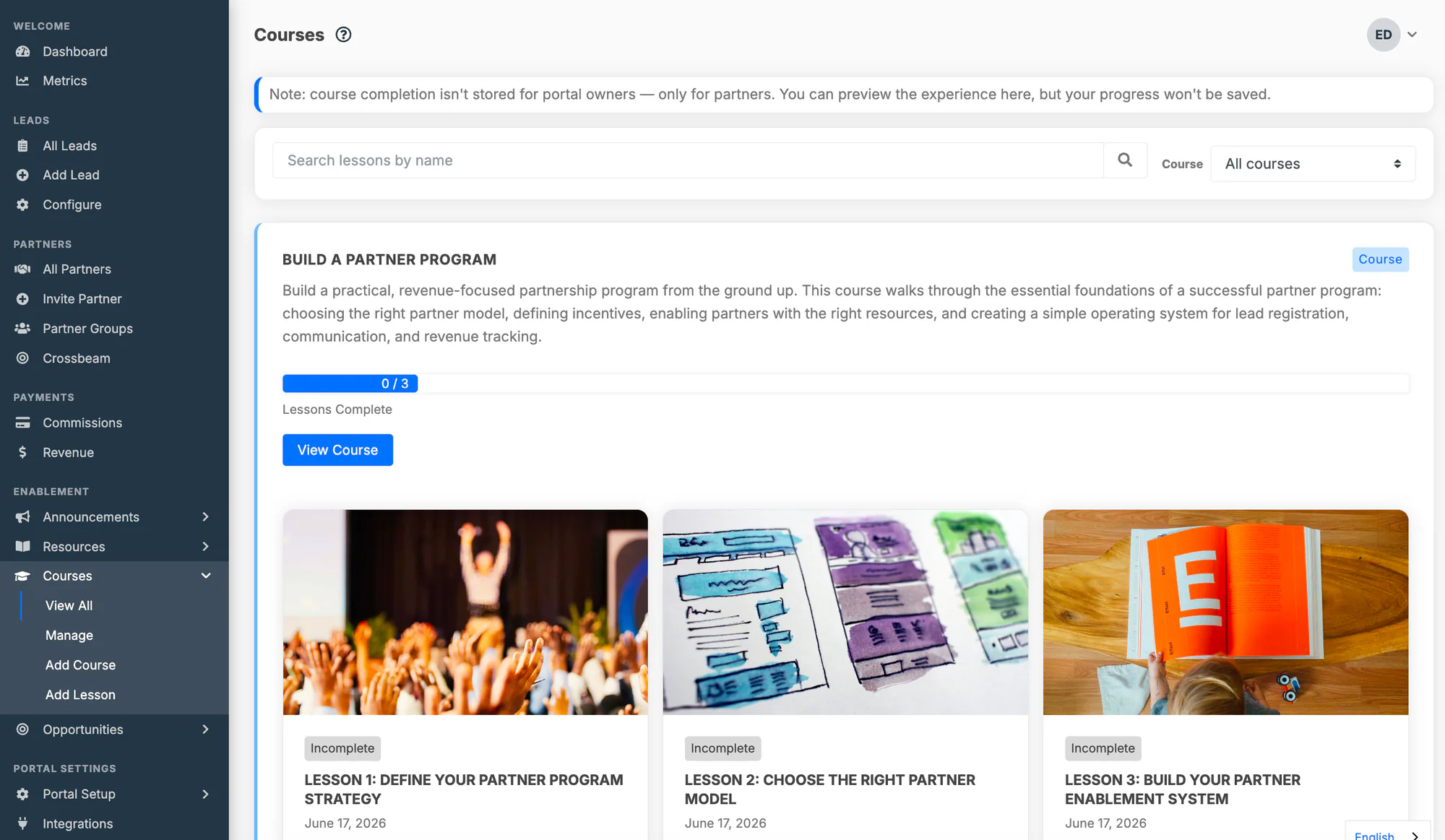
- Courses and lessons. A course is an ordered set of lessons. Content lessons are rich posts: text, images, embedded video, links into the portal, and downloadable attachments. A single piece of content can be a lesson in a course and a resource in your library at the same time.
- Quiz lessons. A lesson made of multiple-choice questions, with single or multiple correct answers, a pass mark (default 70%), and an optional attempt limit. Answer choices are shuffled on each attempt. Partners see which questions they missed but not the correct answers. A quiz lesson can only be completed by passing it.
- Access by partner group or individual partner. Assign partner groups to a course and every partner in those groups sees it. Share a course directly with specific partners when a group would be overkill. Partners outside both see nothing.
- Progress and completion. A course player with a progress bar, a numbered lesson sidebar, resume-where-you-left-off, and shareable lesson links. Completion is recorded per partner user. Each lesson keeps an engagement history of which partner organizations and users viewed and completed it.
- Certifications. Define a badged credential. Connect it to the courses that earn it, all of them or any one, for automatic award. Or award it by hand for training that happens outside the portal. Credentials are held by the person. A partner organization shows as certified while at least one active user holds it. A partner tier can require a certification, so earning one can move a partner to a higher commission rate.
What it does not do, so you can decide with the facts: no SCORM or xAPI import, no free-text or proctored assessments, no automatic expiry or recertification (awards stand until revoked), and no separate branded learning portals. The training lives in the partner portal by design. If you need those features, the partner-education platforms above are the segment to look at.
For setup, see the Courses documentation and the partner certifications documentation. For the background on why we built training into the PRM rather than beside it, see the built-in partner LMS announcement.
Related reading
- Partner Training Software — what to train partners on, how to organize courses, and when a shared folder stops working. The companion to this page.
- Channel Partner Enablement — the wider discipline training belongs to: content, tools, and co-marketing that equip partners to sell.
- Channel Partner Onboarding — the first weeks after signing, where the first course does much of the work.
- Channel Partner Incentives — tiers, rates, and SPIFFs, including how certifications gate them.
- Partner Engagement — keeping partners active after onboarding, where training completion is one of the earliest signals.
- Best PRM Software in 2026 — how the major PRM platforms compare, including enablement and training.
Frequently asked questions
What is a partner LMS?
A partner LMS (partner learning management system) is a learning platform built to train people who work for other companies: resellers, referral partners, distributors, agencies, and technology partners. It organizes training into courses and lessons. It controls which partner organizations can see which training. It tests and certifies what partners have learned. It reports completion per partner company and per user. The defining difference from a standard LMS is the audience. The learners belong to many independent organizations that you do not manage and cannot compel.
What's the difference between a partner LMS and a regular LMS?
A regular (employee) LMS assumes one organization. The learners are on your payroll. HR assigns training, and compliance is often the goal. A partner LMS assumes many external organizations. The learners cannot be mandated. Access is scoped by partner company and tier rather than by department. Revenue is the goal. In practice that means partner-scoped identity and access, per-organization reporting, certifications tied to program benefits, and a learner experience that sits where partners already work, usually the partner portal.
Does a PRM include an LMS?
Some do and some do not, and the depth varies. PartnerPortal includes courses, quiz lessons, and certifications on every plan. JourneyBee offers an LMS as an add-on module quoted with the plan. Introw includes a partner LMS with AI course generation and SCORM import. Enterprise suites such as Impartner and ZINFI include SCORM-capable training applications. Other PRMs, including Kiflo, do not include built-in training. Check what is included, what is an add-on, and whether completion data stays inside the PRM.
What is an LMS for partner training supposed to track?
At minimum: which partner organizations and users have started, progressed through, and completed each course, their quiz scores and pass-or-fail results, and which certifications each person holds. A good partner LMS also records lesson-level engagement, meaning who viewed what and when. The most useful comparison is trained partners against untrained ones on deal registrations, win rate, and time to first deal. That is only possible when training data and deal data live in, or sync to, the same system.
Do I need SCORM for partner training?
Only if you already own a library of SCORM or xAPI courseware, or you plan to buy off-the-shelf courses built in those formats. SCORM is a packaging standard for interoperable e-learning content. It matters for large organizations moving content between systems. Many SMB and mid-market partner programs author short, product-specific lessons directly in whatever system they use and never touch SCORM. If you are unsure whether you need it, you probably do not yet.
How do partner certifications work in an LMS?
You define a credential: a name, a badge, and the rule for earning it. You connect it to one or more courses. When a partner user completes the required courses, or passes the required quizzes, the certification is awarded automatically. Some systems also allow manual awards for in-person training. The credential is usually held by the person, not the company. A partner organization counts as certified while at least one active user holds it. The commercial value comes from what the certification unlocks: a higher partner tier, a better commission rate, deal-registration rights, or a listing in your partner directory.
How much does a partner LMS cost?
It spans three ranges. Training built into a PRM is often included in the PRM price. PartnerPortal includes it on every plan, from the free tier to $399 a month. JourneyBee quotes its LMS module on top of plans starting at $499 a month. General-purpose LMSs with public pricing run from roughly $119 to $449 a month (TalentLMS) or $8,000 to $15,000 and up per year (Litmos). Dedicated customer-and-partner education platforms such as Skilljar, Intellum, Thought Industries, LearnUpon, and Docebo are quote-based. They are typically priced on active learners and commonly reach five figures a year before add-ons. Prices verified October 2026. Confirm current pricing with each vendor.
Can I use my employee LMS for channel partners?
You can, and some large companies do. It is usually a compromise. Employee LMSs model one organization, assign training by department or manager, and assume you can require completion. Partners belong to other companies, need access without internal credentials, and cannot be compelled. Many employee LMSs now sell an extended-enterprise add-on with separate branded portals for external audiences. That closes part of the gap. The remaining problem is adoption. Partners still have a second login and a second place to go, separate from where they register deals and check commissions.
What should a channel partner training platform include?
Courses made of ordered lessons that hold video, documents, and links. Access control by partner group, tier, or individual partner. Quizzes with a pass mark, so completion means something. Certifications that are awarded automatically and tied to program benefits. Per-organization and per-user progress reporting. A connection to your PRM and CRM, so training status sits next to deal and revenue data. Depending on scale, you may also want SCORM import, recertification workflows, multi-language delivery, and learning paths with prerequisites.
How do I get partners to actually complete training?
Remove the reasons they do not. Put training where they already log in, which is the partner portal rather than a separate system. Keep the first course short and tied to the first thing they need to do, such as registering a deal. Make the credential worth something: a tier, a commission rate, a directory listing. Follow up personally in the first week. Mandates rarely work with partners, because you have no authority over their staff. A first course that is the fastest path to a first commission tends to get completed without one.