
Partner Directory: What It Is, and How to Build One
What a partner directory is, why it matters, the ways to build one, the software options compared, and how to keep it current and useful.
Written by the team at PartnerPortal — PRM software used to run B2B partner and channel programs.
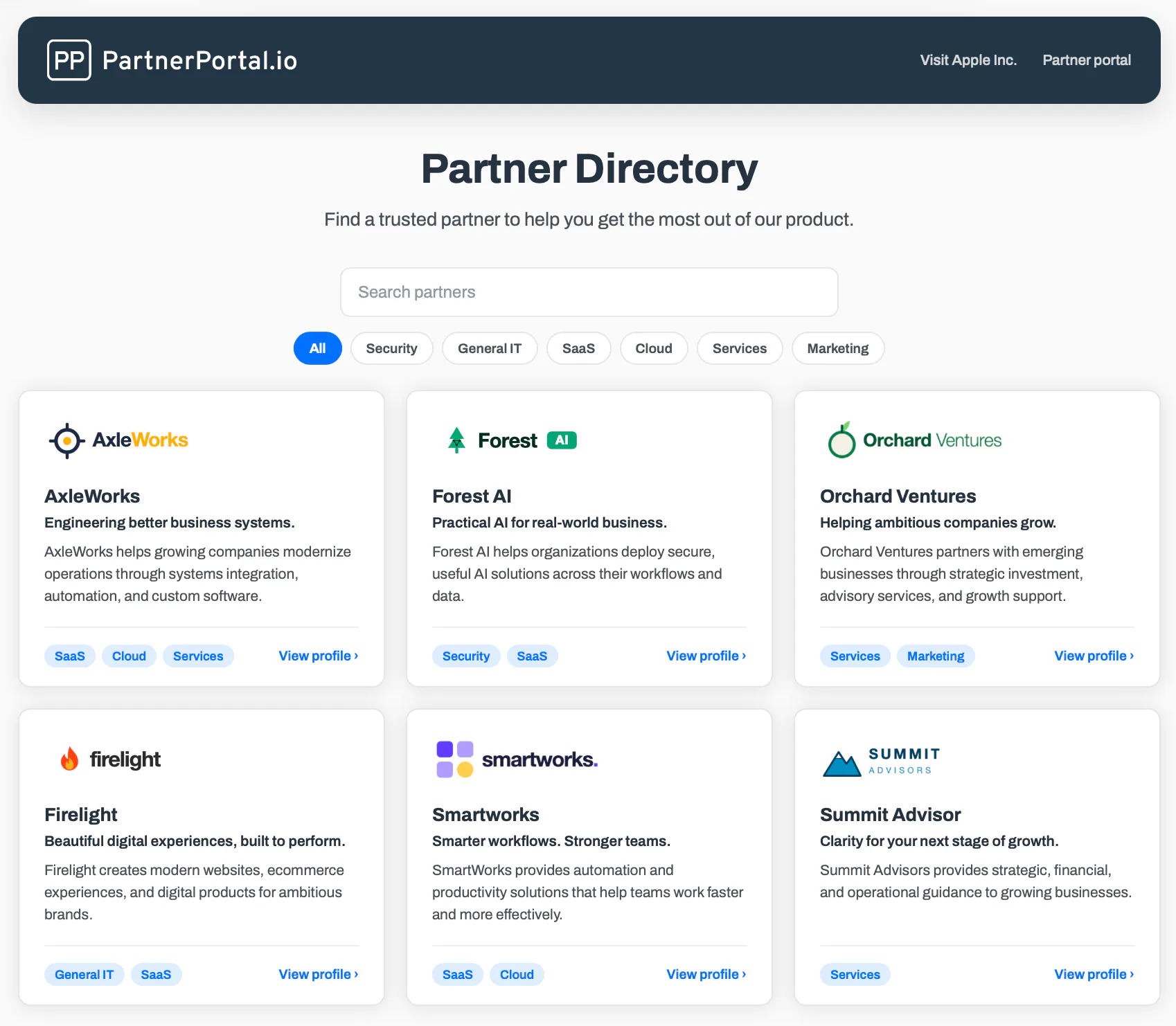
A partner directory is a public, searchable listing of a company’s authorized partners — resellers, agencies, implementation partners, and technology partners — published on the company’s website so that buyers and customers can find, evaluate, and contact the right partner for their need. Each entry is a profile: the partner’s logo, a description, their specializations and certifications, their location, and a way to get in touch. Visitors narrow the list with filters like geography, industry, service type, partner tier, or certification.
It is the point where your internal partner data becomes something the market can use. This guide explains what a partner directory is and is not, why it matters to buyers, partners, and you, what a good one looks like, the ways to build one and the software that does it, how to run one well, and the search and AI discoverability question most vendors skip.
In short:
- A partner directory is a public, searchable list of your authorized partners, so a customer who wants help can find the right one without asking you.
- It pays off three ways. Buyers get a vetted shortlist, partners get in front of customers who are ready to buy, and your team stops fielding every “can you recommend someone?” by hand.
- A good one is a set of real profiles (what the partner does, where, for whom, with what credentials), filters that match how buyers choose, and a next step on every listing.
- Partners should maintain their own profiles and you should control what goes live. Stale listings are what kill directories, and a directory that runs on your live partner data stays current on its own.
- Build it on your CMS, with dedicated directory software, or with the directory inside your PRM. If you want it to rank in search or be cited by AI, confirm each listing is its own indexable page before you pick a tool.
What is a partner directory?
A partner directory is the public face of your partner program. Internally, a program tracks who is enrolled, at what tier, with which certifications and specializations. A directory takes the parts of that data that are safe and useful to show, and publishes them as a searchable list of profiles a prospective customer can browse without logging in.
Who it lists, and who it serves
The companies in a directory sell, resell, implement, or extend your product but do not work for you. For most programs that means resellers and distributors, consultants and agencies, system integrators and managed service providers. For software companies it often also means technology and integration partners.
The people the directory serves are different. They are customers and prospects who have already decided they want a partner’s help and now need to find the right one. A buyer landing on a directory is not asking “should I use this product?” They are asking “who can implement it for me in Germany, with healthcare experience?” That is a much later, much higher-intent question than most of your marketing site answers.
Directory, locator, finder, marketplace: the terminology
The vocabulary in this space is loose. Vendors use different words for overlapping things, and the differences that matter get lost among the ones that do not.
| Term | What it is | Best for |
|---|---|---|
| Logo wall | A static grid of partner logos, sometimes linked. Answers only “who are your partners?” | A trust signal on a homepage, not real discovery |
| Partner directory | A searchable, filterable list of partner profiles | Helping buyers discover and contact service partners |
| Partner locator or finder | The same tool, named for geographic or search emphasis | ”Find a partner near me” and “where to buy” |
| Partner or app marketplace | Listings for apps and integrations, often with an install or transaction action | Discovering and adopting software integrations |
The first three rows are mostly a question of ambition, and “locator” and “finder” are just other names vendors use for a directory. The distinction that actually matters is the last one.
Directory and marketplace are genuinely different jobs. A directory is about discovering people and companies: the consultants, agencies, and resellers who help customers succeed. A marketplace is about discovering software: the integrations and apps that extend your product, usually with an install or connect action. The infrastructure looks similar, but the buyer’s intent is different. If you have service partners, you want a directory. If you have apps and integrations, you want a marketplace. If you have both, you eventually need both.
There is a useful way to think about the whole spectrum. A logo wall creates visibility: options exist. A directory adds discovery: buyers can find the right option. A marketplace adds interaction: buyers can contact, install, or transact. The most mature platforms add matching, where the tool helps a buyer choose. Most programs need discovery done well before they need anything more.
Directory vs. portal vs. program page
A directory is often confused with two other surfaces that live in the same platform. A partner portal is the private, logged-in workspace where partners register deals, find resources, and get paid. A partner-program page is the marketing page that recruits new partners into the program. A partner directory is the third surface: a public place where customers discover partners who are already in the program. Same platform, three jobs, three audiences.
Why partner directories matter
A directory earns its place because it creates value for three parties at once, and the value to each one reinforces the others.
For buyers, it solves a real and slightly annoying problem. Once a customer decides they want help implementing, customizing, or supporting your product, they have to find someone they can trust. Without a directory, they wait on your sales team for a referral or fall back to a web search that surfaces inactive, unqualified, or unauthorized providers alongside the good ones. A directory gives them a vetted shortlist they can narrow to their geography, industry, and need, with your implicit endorsement that these partners are legitimate.
For partners, a listing is a commercial asset rather than a vanity badge. It puts their credentials in front of buyers who are already looking to purchase, which is the highest-intent moment anywhere in the channel. A vendor-endorsed listing lends the partner your brand and reaches demand they could not reach alone. Ask partners what they value most about a program and directory visibility is often near the top, sometimes above the commission.
For you, the directory removes a bottleneck and protects the brand. Every “can you recommend someone?” that used to route through a person now serves itself. It steers customers toward authorized partners and away from unqualified ones. It also activates the channel: customers who engage a partner tend to adopt more and churn less, so connecting demand to partners is a growth lever, not just a convenience. And it is one of the clearest ways to show partners you are investing in their pipeline, which makes recruiting and keeping good partners easier.
What a great partner directory looks like
A directory is only as useful as its profiles, its filters, and what happens when a buyer finds the right partner. The best directories are consistent about all three.
The profile
Every profile starts with the logo and company name, because that is what a buyer scans first. Under it sits a short tagline and a longer description that explain what the partner does and who they serve. Then the substance: the specializations and services the buyer is actually filtering for, the certifications, tiers, and badges that show program standing, and the location and service area that regional buyers need. Richer directories add proof, such as case studies, work samples, reviews, or ratings. Every profile ends with a clear next step, whether that is “visit website,” “contact,” or “request an introduction.”
The filters
Filters and search are what turn a long list into a useful one. The facets that show up in almost every good directory are geography (country, state, city, or radius), industry, service or solution type, partner tier and certification, and free-text search across names and descriptions.
The test for a filter set is whether it matches how buyers decide. A directory that lists 150 partners with no meaningful filters is barely better than a logo wall. One that lets a buyer ask for “an implementation partner in Germany with healthcare experience” and get five results is a directory people use.
The next step
No listing should dead-end. A profile that shows a partner’s credentials and then offers no way to act generates a page view, not a lead. The simplest version is a link to the partner’s website. The more mature version is a contact or introduction form that routes the inquiry to the partner and records it as an attributed lead in your CRM, so both you and the partner can see what the directory returns.
Examples worth studying
The strongest reference points are the directories run by large platform companies, because they have iterated on them for years and you can copy their structure without their scale. A few worth opening in another tab:
The Atlassian Partner Directory is a clean model for a services directory. Buyers filter by country and region, solution, industry, company-size specialization, and type of engagement, and every card shows the partner’s tier, with Platinum Solution Partners marked prominently. The Google Partners Directory lists advertising agencies and lets buyers filter by location, minimum budget, industry, and specialization, with Partner and Premier Partner badges as the trust signal. The Adobe Solution Partner Directory organizes thousands of partners by level (Platinum, Gold, Silver, Bronze), specialization, and award, and shows how a large program uses tiers to sort a very long list. The Databricks Partner Directory covers both consulting partners and technology partners in one place, filtered by partner type, region, and validated solution, which makes it a good example of a directory and a marketplace sharing one front door.
HubSpot’s Solutions Directory adds two ideas worth copying: review counts alongside tiers, and a guided questionnaire that recommends partners rather than leaving buyers with a raw list. Shopify’s Partner Directory leans on reviews, work samples, and price filters. Webflow’s Certified Partners page emphasizes vetting up front (“thoroughly qualified by the Webflow team”).
The common patterns across all of them: filters that match real buyer criteria, tiers and reviews as trust signals, a recommendation step where possible, and a frictionless path to contact.
How to build a partner directory
There are five broad routes, roughly ordered from cheapest to start to most capable. Most programs move up this ladder as they grow, and there is no shame in starting at the bottom.
1. A hand-built page on your CMS. Build a page in Webflow or WordPress and list partners by hand. It is cheap, fully under your design control, and fine for a handful of partners. The costs arrive later. Someone has to update it manually, there is no self-service and no lead attribution, filtering is weak, and it goes stale the moment a partner changes anything.
2. A CMS plus a directory or locator plugin. Add faceted search and maps with WordPress custom post types and a filtering plugin, or a store-locator tool from the same lineage as retail “where to buy” and dealer-locator pages. This buys real filtering and maps without custom development. The data is still yours to maintain by hand, and it still needs admin time to keep current.
3. Dedicated partner-directory or marketplace software. Purpose-built tools such as PartnerPage, Partner Fleet, and Builtfirst give you partner-submitted listings, lead capture, analytics, and indexable pages out of the box, white-labeled to your brand. The trade-off is another system to run and, unless you sync it, another copy of partner data to keep aligned.
4. A directory built into your PRM or partner portal. If you already run a PRM, its directory runs on the partner data you already manage. It stays current with no separate upkeep, partners maintain their own profiles in the same place they register deals, and you have one fewer system. The thing to check is how it renders, covered below: some portal directories are built as a branded destination you send buyers to rather than a page that wins organic search.
5. An enterprise marketplace or commerce platform. Platforms such as AppDirect handle transactions, licensing, and billing on top of discovery. This is the right tool if you are building an app store that processes payments. It is overkill if you just want buyers to find and contact partners.
Partner directory software
The tools split into two camps: partner platforms that include a directory, and standalone directory or marketplace software. We make one of these products, so treat our entry accordingly. We have tried to describe every tool by its real strengths.
Pricing and capabilities are as published in September 2026 and change often. Verify against each vendor before deciding.
| Tool | Type | Best for | Price |
|---|---|---|---|
| PartnerPortal | PRM with built-in directory | Programs that want a branded directory on the partner data they already run, at no extra cost | Included on every plan, including free |
| Kiflo | PRM with directory add-on | Embedded, white-label directories with contact forms that create CRM leads | Add-on to plans from $399/mo |
| PartnerStack | Partner network, no native directory | Affiliate and referral programs that want a directory via PartnerPage | Not published |
| Impartner, ZINFI | Enterprise PRM with locator | Large channels with regional “where to buy” needs and lead routing | Enterprise, quote-based |
| PartnerPage | Standalone directory | Service and technology partner directories with referral tracking | Free to 15 partners, $500/mo unlimited |
| Partner Fleet | Standalone marketplace | Indexable listings built to rank and be cited by AI | Quote-based, median ~$12K/yr |
| Builtfirst (AppDirect) | Marketplace platform | Perk and integration marketplaces that may grow into commerce | From $249/mo, commerce from $1,499/mo |
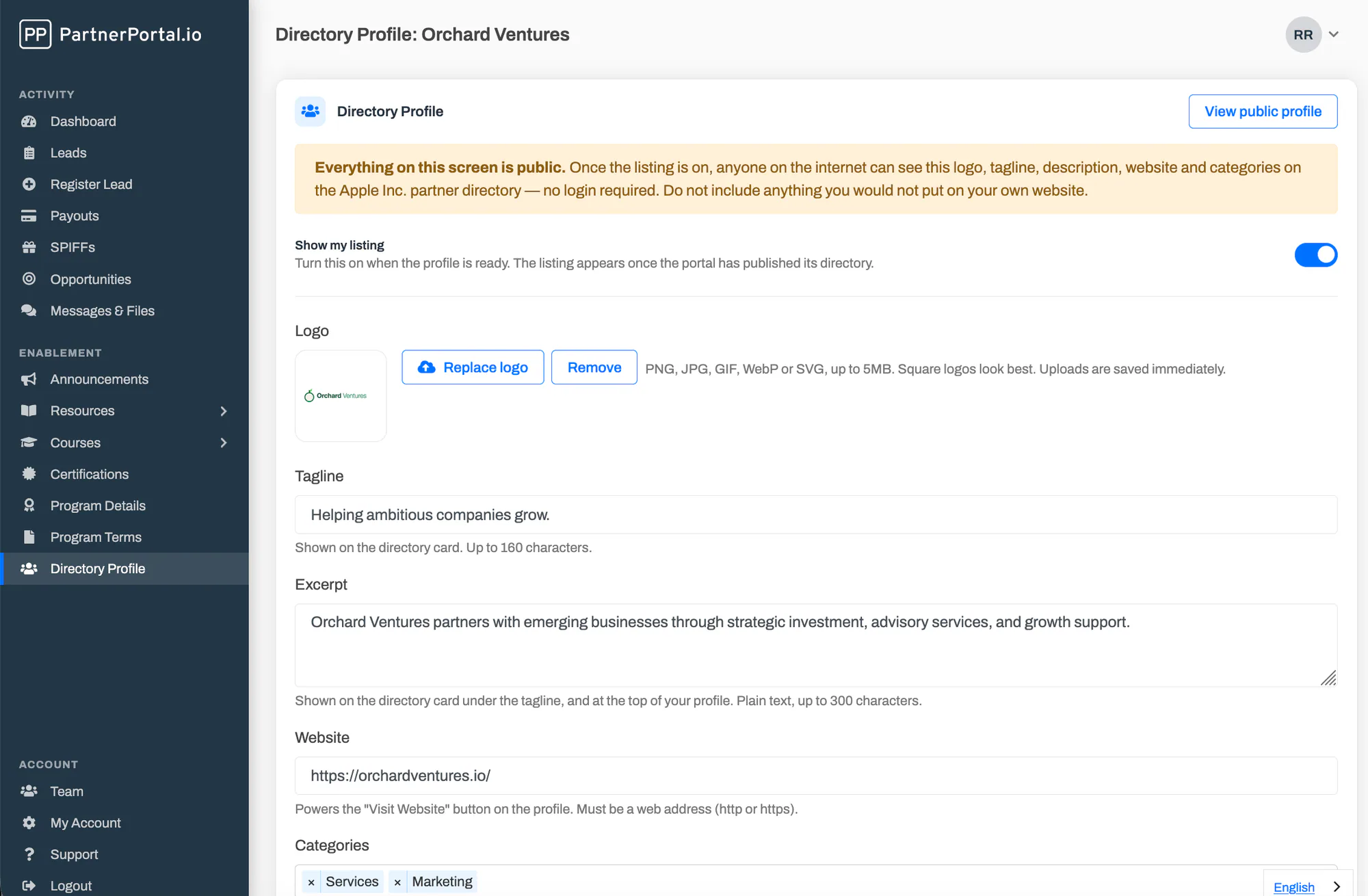
PartnerPortal includes a public, branded partner directory on every plan, including the free tier. Partners maintain their own profiles (logo, tagline, excerpt, description, categories, location) with a live preview of the card and full page, and a listing goes public only when both the partner and you have switched it on. Because it runs on your live partner records, a partner who leaves the program disappears from the directory automatically. It is a showcase directory today: profiles link out via a “Visit Website” button rather than capturing leads, and like the rest of the portal it is rendered in the browser, so it is built as a destination you send buyers to rather than an organic-search play. See the partner directory feature, or the launch announcement for how it works.
Kiflo sells a white-label, no-code directory builder you embed on your own site, backed by the partner data you already manage in Kiflo. Each profile carries a contact form, and a submission becomes a lead tagged to that partner and synced to your CRM. Kiflo states that every partner profile is an indexed page. The directory builder is an add-on to Kiflo’s plans, which start at $399 per month for 25 partners.
PartnerStack has no website directory of its own, but it runs a large public partner network for recruiting, and it integrates with PartnerPage to publish one: partners in a chosen PartnerStack group are invited to create a listing, tiers and certifications sync across, and leads from a listing are attributed back in PartnerStack.
Impartner and ZINFI, the enterprise channel suites, include a partner locator (Impartner Locator, ZINFI’s Partner Locator). Both are “where to buy” experiences with list and map views, search across the facets tracked in the portal, partner-managed content, real-time lead routing to partners, and analytics. They are built for large channels and priced accordingly.
PartnerPage is a dedicated partner-directory product for both service and technology partners. Partners submit listings you approve, and the directory supports filters, reviews and ratings, tiers and badges, custom branding and URL, referral tracking, and Salesforce, HubSpot, and PartnerStack sync. The free plan covers up to 15 partners. Growth is $500 per month with unlimited partners, and Enterprise adds directory translation and custom integrations at custom pricing. Customers include Zapier, Airtable, Typeform, and Klaviyo.
Partner Fleet is a “marketplace-in-a-box” spanning public marketplaces, in-app marketplaces, and developer portals, with partner-managed listings, lead capture and CRM integration, an application flow, analytics, and paid featured placements. Its distinctive claim is that listings render as fully indexable static HTML, built to rank in search and be cited by AI. Pricing is modular and quote-based; a third-party benchmark puts the median at roughly $12,000 per year.
Builtfirst, now part of AppDirect, is a no-code platform for perk, integration, reseller, and service marketplaces. The Essentials plan is $249 per month billed annually and includes white-labeling, analytics, and an embeddable marketplace. The Commerce plan starts at $1,499 per month plus transaction fees and adds provisioning, billing, and reseller portals for teams that want to sell through the marketplace.
Which route is right for you
| Your situation | Start with |
|---|---|
| A handful of partners and you need a credible page this week | A hand-built CMS page. Plan to move up when upkeep becomes a chore. |
| Service partners (agencies, consultants, resellers) and you want it current without babysitting | The directory in your PRM or portal. It runs on data you already keep. |
| Organic search and AI citation are the point of the directory | A tool built for indexable, structured listings, or host the directory on your marketing site. |
| Technology partners and integrations, with installs | A marketplace, possibly alongside a service-partner directory. |
| A large enterprise channel with regional “where to buy” needs | An enterprise locator with map views and lead routing. |
For most SMB and mid-market programs, the answer is the boring one. Use the directory that runs on the partner data you already manage, keep it curated and current, and add a dedicated marketplace or an SEO-first tool only when discovery becomes a specific, measured goal.
How to run a partner directory
Launching a directory is the easy part. Keeping it useful is where most programs fall down, and the failure modes are consistent enough to plan against.
The first decision is who gets listed. A directory is an endorsement, so set the bar and hold it: active status, a tier threshold, a certification, or simply “we have seen this partner do good work.” A shorter list of qualified partners builds more buyer trust than a long list padded with inactive ones. Listing every partner regardless of activity dilutes the endorsement and buries the good ones. The same logic says to launch with a curated core and grow from there, rather than dumping every partner in on day one and producing a thin, low-trust page.
The second is who maintains it. The answer should be the partners. They know their own specializations, they notice when their logo is out of date, and they have every incentive to keep a listing that brings them business looking sharp. Your job is control, not data entry: you decide what goes live and you can pull any listing at any time. That combination keeps the directory fresh without turning your team into clerks, and it keeps quality high.
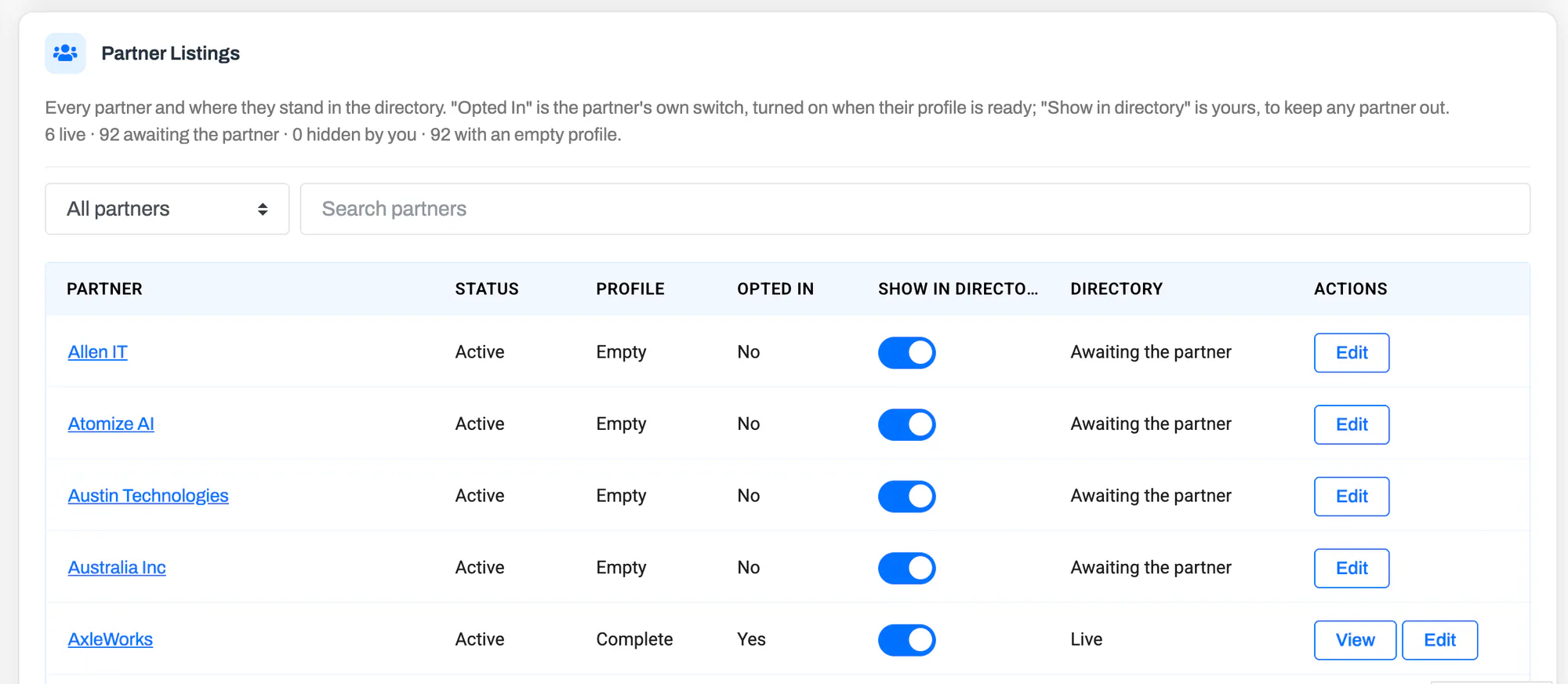
The third is freshness, and it is the one that kills most directories. The fastest way to lose a buyer’s trust is to send them to a partner who has gone dark. A hand-maintained list goes out of date within months. Back the directory with live partner data so that a status change in your program flows through automatically, and prune periodically anyway.
Then there is how you organize it. Structure filters and categories around how customers search, by use case, industry, and region, not around your internal program labels. Buyers do not know or care what you call your tiers. If they cannot filter the way they think, they leave. A related discipline is to keep the category list short: five or six clear categories are easier to browse than thirty.
Give every profile a next step, and measure what comes of it. Track traffic and leads per partner, feature the partners the directory is actually sending business to, and use the numbers when a partner asks what the program does for them. A directory you cannot measure is one you cannot improve.
Finally, be explicit about privacy. Everything in a directory is public. Partners should knowingly write public content, and the tool should make that obvious rather than repurposing private program data into a public page by default. Nobody should discover their street address on your website by accident.
SEO and AI discoverability
This is the part most directory pitches skip, and the one that most often disappoints teams after launch.
A directory can be a genuine source of search and AI-answer traffic, but only if each partner listing is its own indexable page with real, structured content. A row in a table cannot rank in Google or be cited by ChatGPT, Perplexity, or an AI Overview. A dedicated page with the partner’s name, specializations, location, and schema markup can. The directories that win here give every partner a URL, mark the page up with organization and local-business schema, and write for the searches buyers actually run, such as “Salesforce implementation partner Boston.”
The catch is how the directory is rendered. A page that is assembled in the browser with JavaScript may look fine to a visitor and blank to a crawler, and search engines and AI answer engines index it poorly or not at all. It is worth checking rather than assuming, and the big brands are instructive here. Of the four directories linked above, three — Atlassian, Google, and Databricks — return their listings in the initial HTML, so a plain fetch pulls real content and those partner pages can be indexed. Only Adobe’s returns a near-empty shell that fills in after load. In other words, the larger programs mostly invest in making their directories crawlable, precisely because discovery is part of the point. PartnerPortal’s directory, by contrast, renders in the browser like Adobe’s — it runs inside the portal application and paints after the page loads. That is a deliberate trade-off: it is built as a branded destination you send buyers to, not an organic-search play. Other portal-based directories vary, so ask the vendor directly or run a listing through a rendering test before you count on organic traffic. Standalone tools such as Partner Fleet make indexable rendering their headline feature for exactly this reason, and Kiflo says every partner profile is an indexed page.
The practical decision comes down to what you want the directory to do. If its job is to be a destination, a branded page you send buyers to from your sales team, your emails, and your site navigation, then rendering in the browser is perfectly fine and the freshness and curation points above matter far more. If you need the directory to be found, to rank for “[your product] implementation partner” and be cited in AI answers, then choose a platform that renders indexable pages or publish the directory on your marketing site.
Either way, the same basics apply. Structured profiles, FAQ and schema markup, and current content all help. AI engines deprioritize stale pages and cite fresh, well-structured ones, which loops straight back to the freshness point. One more thing that helps both sides: when you list a partner and they link back to their listing, both pages gain credibility with search and answer engines. A caution in the other direction: spinning up hundreds of thin profiles at once reads as scaled, low-value content and gets ignored. Depth per profile beats volume.
Related reading
- What is a partner portal? — the private workspace a directory sits alongside.
- Best PRM software in 2026 — the platforms that run partner programs, several with built-in directories.
- Channel partner recruitment — a directory is both a recruiting draw and a discovery tool.
- What is channel management? — the broader discipline a directory supports.
- PartnerPortal’s partner directory — how ours works, switch by switch.
- PartnerPortal is now a PRM with a partner directory — the feature launch.
Running a partner program and want a branded directory that stays current on the partner data you already manage? Launch a free portal and turn it on when you are ready.
Frequently asked questions
What is a partner directory?
A partner directory is a public, searchable page on a company website that lists its authorized partners — resellers, agencies, implementation partners, technology and integration partners — so buyers and customers can find and contact the right one. Each listing is a profile with the partner logo, description, specializations, location, and usually a way to get in touch. Buyers filter by criteria like geography, industry, service, tier, or certification.
What is the difference between a partner directory and a partner marketplace?
A partner directory is built for discovering people and companies — service partners, consultants, agencies, and resellers who help customers get value from your product. A partner (or app) marketplace is built for discovering and often installing software — integrations and apps that extend your product. The infrastructure is similar; the job is different. Programs with both service and technology partners often run both.
What is the difference between a partner directory and a partner locator?
In practice they mean the same thing. Partner locator, partner finder, and find-a-partner are alternate names for the same buyer-facing tool. Locator emphasizes geographic search (find a partner near me), finder emphasizes discovery, and directory emphasizes the browsable catalog — but they all describe a searchable, filterable list of a vendor’s authorized partners.
How do I build a partner directory?
There are four common routes: build a page by hand on your CMS (Webflow or WordPress); add a directory or store-locator plugin to that CMS; use dedicated partner-directory or marketplace software such as PartnerPage or Partner Fleet; or use the directory built into a PRM or partner portal such as PartnerPortal or Kiflo. A hand-built page is cheapest to start but goes stale fastest; a directory backed by live partner data stays current on its own.
What is the best partner directory software?
There is no single best tool — it depends on whether you list service partners or technology integrations, whether the directory needs to rank in search, and whether you want it tied to the partner data you already manage. Dedicated tools like PartnerPage and Partner Fleet lead on standalone directories and marketplaces; PRM-backed directories from PartnerPortal and Kiflo keep listings current because they run on your live partner records; enterprise suites like Impartner and ZINFI include partner locators for large channels.
Do partner directories help SEO?
They can, but only if each partner listing is its own indexable page with real content and structured data — a row in a table cannot rank, but a page can. Some directories built into partner portals are rendered in the browser (client-side), which means search engines and AI answer engines may see a blank page. If organic discovery matters, confirm the directory renders indexable pages, or host it on your marketing site.
Do partners manage their own directory profiles?
In the better tools, yes. Partners fill in and update their own profile — logo, description, specializations, links — and the vendor controls what goes live. Self-service is what keeps a directory current without your team chasing partners for updates, while vendor control keeps quality and accuracy high.