· Erick Danzer · 5 min read
PartnerPortal Is Now a PRM With a Partner Directory
PartnerPortal is now a PRM with a built-in partner directory — a public, branded page where prospects browse your partners, filter them by category, and open a profile for each one. Partners maintain their own listings, and the directory stays current because it runs on the partner data you already manage.
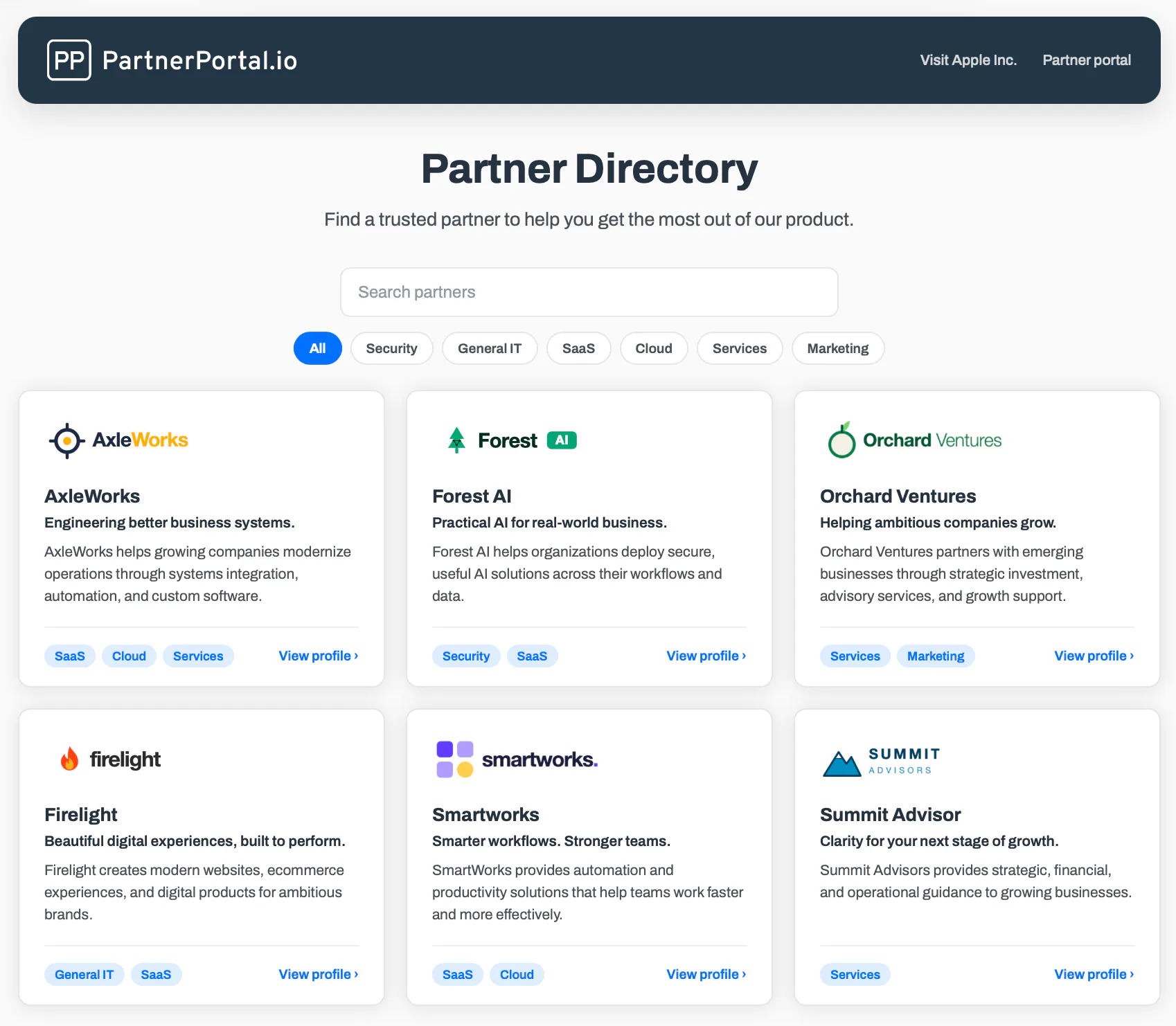
PartnerPortal — a partner relationship management (PRM) platform — is now a PRM with a built-in partner directory. You can publish a public, branded page where prospects and customers browse your partners, filter them by category, search, and open a dedicated profile for each one — built from the same partner data you already manage in the portal, so it stays current on its own.
Why a partner directory belongs in your PRM
Once a customer decides they want a partner to implement, customize, or support your product, they have to find one they can trust. A partner directory is how they do it: a public, searchable list of your partners, with your implicit endorsement that these are the real ones. For your partners, a listing is one of the most tangible benefits of your program — it puts them in front of buyers at the highest-intent moment there is. (For the full picture — what a partner directory is, the approaches, and the software landscape — see our guide to the partner directory.)
The problem with most directories is that they live on their own. A page built by hand on your website drifts out of date the moment a partner changes their focus, moves tier, or leaves the program — and a buyer who contacts a partner that has gone dark is a warm introduction wasted. Building the directory into your PRM fixes that at the root: it runs on the partner records you already keep, so when a partner’s details change or they leave, the directory follows automatically. There is no second copy of the data to maintain.
What the partner directory does
The directory is a public page at /directory on your portal’s address — your subdomain or custom domain — with its own clean, buyer-facing layout: your logo and branding, a search box, category filters, and a grid of partner cards that open into full profiles. Here’s what you get:
- A public, branded directory page. It inherits your portal’s logo, colors, and fonts, so it looks like your site, not ours. No login required.
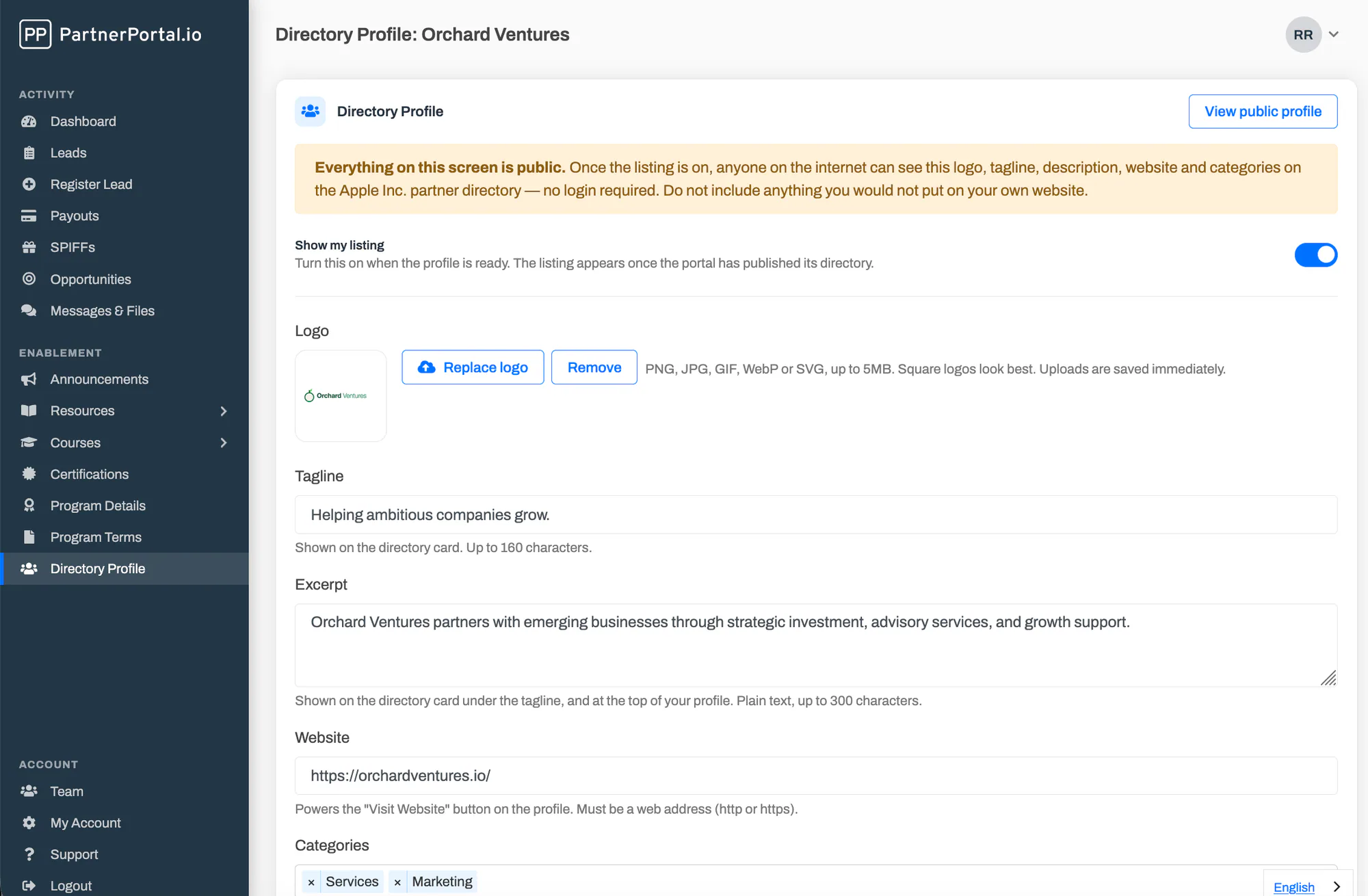
- Partner-maintained profiles. Each partner fills in their own logo, tagline, a short excerpt, a rich-text description, website, categories, and an optional location — with a live preview of exactly how their card and profile page will look.
- Categories, search, and filtering. You define the categories buyers filter by; visitors also search across names, taglines, and excerpts to narrow a long list to the right few.
- A dedicated profile page per partner. Each listing opens to a profile with the partner’s logo, description, categories, location, and a Visit Website button that sends the buyer straight to the partner.
You choose exactly what’s public
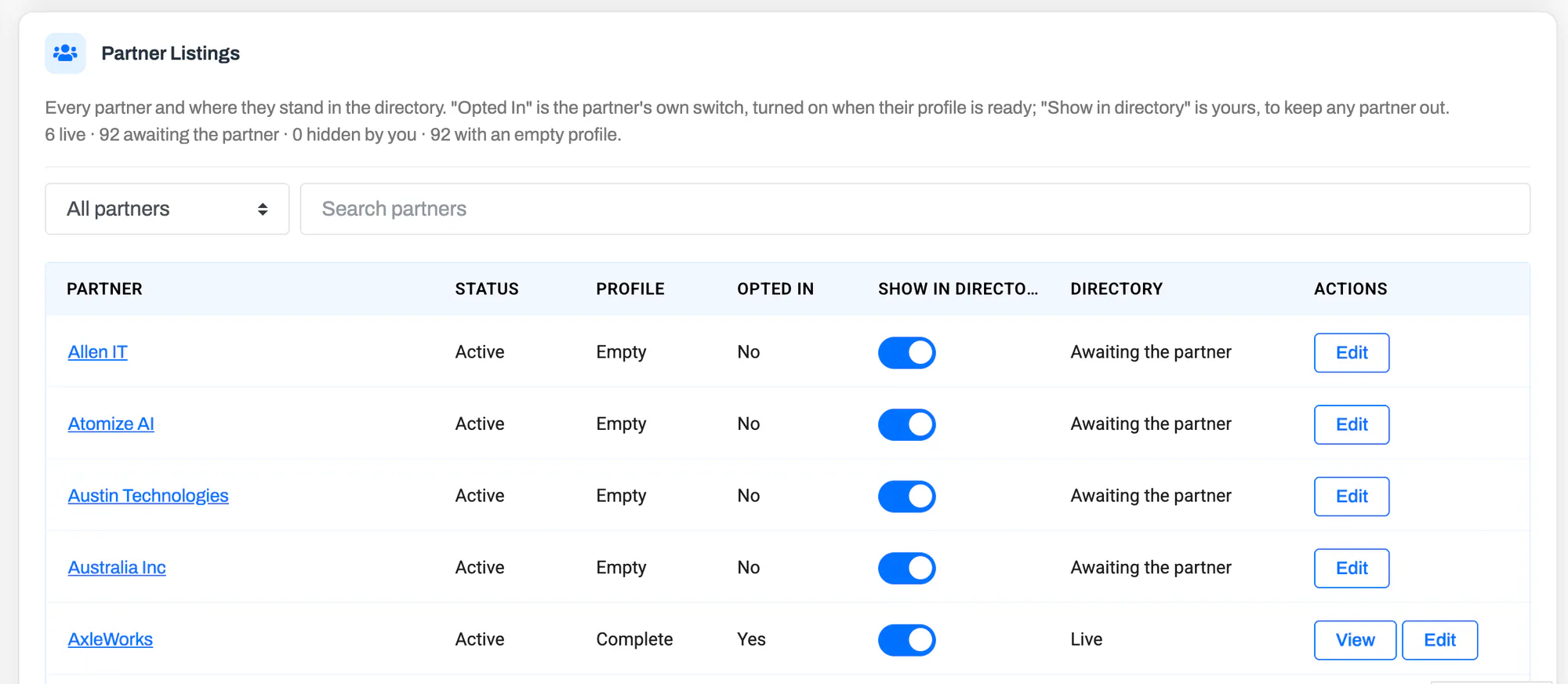
A public page built on partner data has to be safe by default, so nothing is exposed by accident. A partner appears only when three switches all line up:
- You’ve published the directory for your portal.
- The partner has turned on their own listing — off until they’re ready.
- You’re showing that partner — a per-partner switch, on by default, that lets you keep anyone out even if they’ve opted in.
On top of that, only active partners ever appear, the edit screen tells partners plainly that everything on it is public, and location is opt-in and limited to city, state, and country — a partner’s street address is never shown. The practical upshot: you can turn the feature on weeks before you publish, let partners fill in their profiles at their own pace, review who’s ready in the Partner Listings view, and go live only when the directory looks the way you want.
Setting up your directory
Getting a directory live takes a handful of steps:
- Go to Enablement → Directory and turn on Enable the partner directory. Partners now see a Directory Profile item in their menu.
- Add your categories so partners can tag their profiles and buyers can filter.
- Set the title and introduction shown at the top of the public page.
- Ask partners to fill in their profiles and turn on their listing — or fill them in yourself from each partner’s page.
- When you’re happy with what’s listed, turn on Publish the directory. The page is live at
/directory, and a “Directory” link appears on your portal’s sign-in pages.
For the full walkthrough — profiles, categories, the listings grid, and what buyers see — see the partner directory documentation.
Who it’s for
Any PartnerPortal customer who wants prospects and customers to be able to find their partners — resellers, agencies, consultants, implementation and technology partners — without emailing your team for a recommendation. It’s especially useful if you’ve been keeping a partner list on a hand-built web page and want one that maintains itself, and if you want to give partners a visible, vendor-endorsed reason to stay engaged with your program.
Getting started
If you’re already a customer, open Enablement → Directory in your portal to turn it on and build your first listings. If you’re evaluating PartnerPortal as the PRM for your partner program, you can launch a free portal at partnerportal.io and explore the directory alongside everything else — it’s included on every plan.
As always, if there’s a directory workflow you’d like to see — lead capture from a profile is the one we hear most — we want to hear about it.
Frequently asked questions
Does PartnerPortal have a partner directory?
Yes. PartnerPortal now includes a built-in partner directory — a public, branded page on your portal where prospects and customers browse your partners, filter them by category, search, and open a profile for each one. Partners maintain their own profiles inside the portal, and you decide when the directory goes live and who appears on it.
What is a PRM with a partner directory?
A PRM (partner relationship management) platform with a partner directory publishes a public, buyer-facing listing of your partners from the same system you use to manage them. Because the directory runs on your live partner records, it stays current on its own — when a partner's details change or they leave the program, the directory follows, with no separate page to maintain. PartnerPortal is a PRM with a built-in partner directory: partner profiles, categories, and filtering all live in the portal your partners already use.
Is the partner directory public?
Yes, once you publish it. The directory lives at /directory on your portal address and needs no login. Nothing is public until you switch it on, and no partner appears until both you and the partner have opted their listing in.
Do partners manage their own directory profiles?
Yes. Each partner fills in their own profile — logo, tagline, excerpt, description, website, categories, and optional location — from a screen inside the portal, with a live preview of how their card and profile page will look. You can also fill in a partner's profile for them to launch a full directory before everyone has logged in.
How do I control which partners appear in the directory?
Three switches all have to be on: the directory is published for your portal, the partner has turned on their own listing, and you are showing that partner. Every partner also has to be active. A Partner Listings view shows you where each partner stands and lets you show or hide any of them.
Is the partner directory included on every plan?
Yes. The partner directory is included on every plan, including the free tier, like the rest of PartnerPortal.