· Erick Danzer · 4 min read
Native Xero PRM Integration: Track Partner Commissions Automatically
PartnerPortal now integrates natively with Xero. Capture customer payments from Xero, match them to partner-sourced leads automatically, and generate accurate partner commissions — no spreadsheets and no middleware.

PartnerPortal — a partner relationship management (PRM) platform — now connects natively to Xero, so the customer payments recorded in your accounting flow straight into your partner commissions. Capture revenue from Xero automatically, match it to the partner who sourced the deal, and generate accurate payouts — with no spreadsheets, no manual reconciliation, and no third-party middleware.
Why a native Xero integration matters
Xero is the dominant cloud-accounting platform in Australia and New Zealand and a strong second in the UK. For teams that run their books in Xero, “we support QuickBooks” was never a real substitute — and getting partner-sourced revenue out of the accounting system and into commission calculations meant exporting CSVs and matching payments to partners by hand.
This is the integration those teams asked for. Xero now joins Stripe and QuickBooks as a first-class revenue source inside PartnerPortal, feeding the same commission and payout engine the rest of the platform already runs on.
What the Xero integration does
This is a native integration, built directly into PartnerPortal the same way our native Attio integration and other native integrations are. There’s nothing extra to build or maintain.
Here’s what you get:
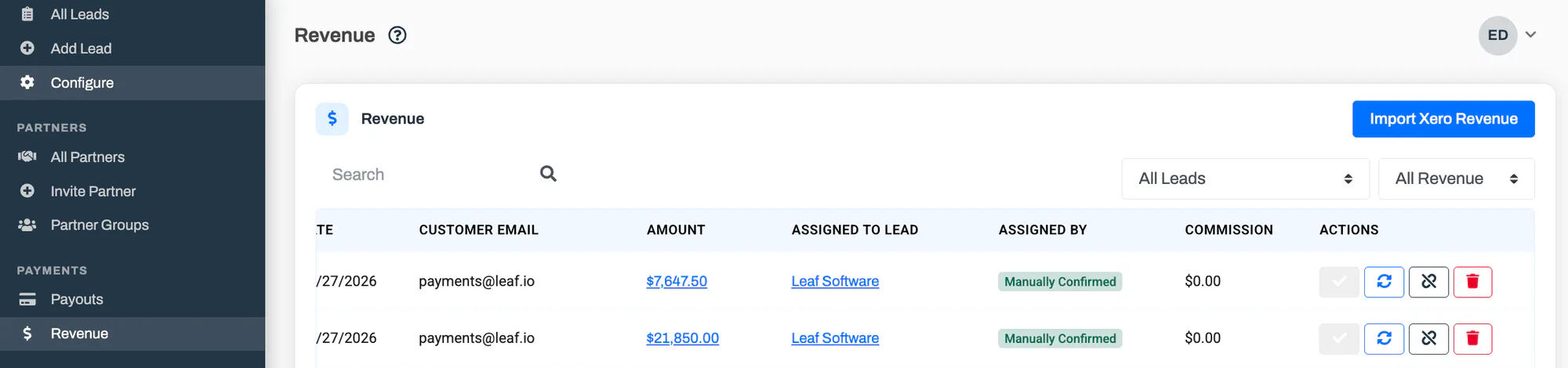
Automatic revenue capture. PartnerPortal reads the customer payments recorded against your sales invoices in Xero and stores them in its in-app Revenue ledger. Money you pay out — supplier and bill payments — is ignored.
Automatic lead and partner matching. Each captured payment is matched to the right lead so the revenue is attributed to the partner who sourced it. PartnerPortal matches on a saved Xero contact mapping first, then an exact customer-email match, then a website-domain match — and once you confirm a match, it remembers the mapping for next time.
Accurate commissions and payouts. Matched Xero revenue flows into whatever commission structure you’ve configured — flat or percentage, one-time or recurring — and rolls up into your scheduled partner payouts. Your finance team gets clean, ready-to-pay outputs; your partners get paid on real, collected revenue.
Read-only by design. PartnerPortal reads your Xero contacts and payments to track revenue and calculate commissions. It never creates, edits, or deletes anything in your Xero organisation.
Historical import. Turning on capture handles new payments going forward. If you want revenue from before you connected, import a date range and PartnerPortal backfills it — skipping anything it has already captured, so importing twice never creates duplicates.
How Xero fits the revenue pipeline
Xero is PartnerPortal’s third native accounting source, alongside Stripe and QuickBooks. All three feed the same provider-agnostic pipeline: money received becomes a revenue record, gets matched to a lead, and drives commission generation and payouts. Whether your revenue lands in Stripe, QuickBooks, or Xero, the partner-facing experience and the finance outputs are identical.
One detail worth understanding: Xero doesn’t send a notification when a payment is received, so PartnerPortal checks Xero for new and changed payments on a regular schedule rather than instantly. New payments appear on the Revenue page a short time after they’re recorded in Xero — reliable and self-correcting, just not to-the-second. Payment deletions in Xero are reflected too, so a reversed payment stops counting toward commissions.
Getting started with the Xero integration
Setup takes just a few minutes:
- In your portal, open Integrations and click Enable Xero.
- Sign in to Xero and approve the connection, then choose the organisation you want to connect.
- Map your leads to their Xero contacts so payments are attributed to the right partner.
That’s it — capture turns on automatically, and new customer payments start flowing into your Revenue ledger on the next check. The full walkthrough, including revenue settings and importing history, is in the Xero integration guide.
Who the Xero integration is for
Any PartnerPortal customer who tracks customer revenue in Xero — especially teams in Australia, New Zealand, and the UK who need partner commissions calculated from real, collected payments without exporting a single spreadsheet.
If you’re already a customer, open Integrations to connect Xero today. If you’re evaluating PartnerPortal as the PRM for a Xero-based finance stack, you can launch a free portal at partnerportal.io to get started, or see how the options compare in our guide to the best PRM software.
As always, if there’s a Xero workflow you’d like us to support, we want to hear it.
Frequently asked questions
Does PartnerPortal integrate with Xero?
Yes. PartnerPortal has a native Xero integration built directly into the platform. It reads the customer payments recorded in your Xero organisation, matches each one to the right partner-sourced lead, and uses that revenue to generate partner commissions and payouts.
Is the Xero integration read-only?
Yes. PartnerPortal only reads contacts and customer payments from Xero to track revenue and calculate commissions. It never creates, edits, or deletes anything in your Xero organisation.
How do partner commissions get calculated from Xero?
When a customer payment is recorded in Xero, PartnerPortal captures it into its in-app Revenue ledger and matches it to a lead — first by a saved Xero contact mapping, then by customer email, then by website domain. Matched revenue then feeds your configured commission rules and scheduled payouts.
How quickly do Xero payments appear in PartnerPortal?
Shortly after they are recorded in Xero, not instantly. Xero does not send a notification when a payment is received, so PartnerPortal checks Xero for new and changed payments on a regular schedule and captures them a short time later.
Which Xero payments count toward commissions?
Customer payments on sales invoices — money received from your customers. Supplier and bill payments are ignored, and customer refunds and credit notes are not captured in this version.