· Erick Danzer · 5 min read
Launch a PRM With Affiliate Linking
PartnerPortal is now a PRM with affiliate linking: every partner gets a personal link, and when someone they refer books a demo, fills in a form, or signs up, PartnerPortal creates a lead credited to that partner — then runs it through your pipeline, CRM, and commissions like any other lead.
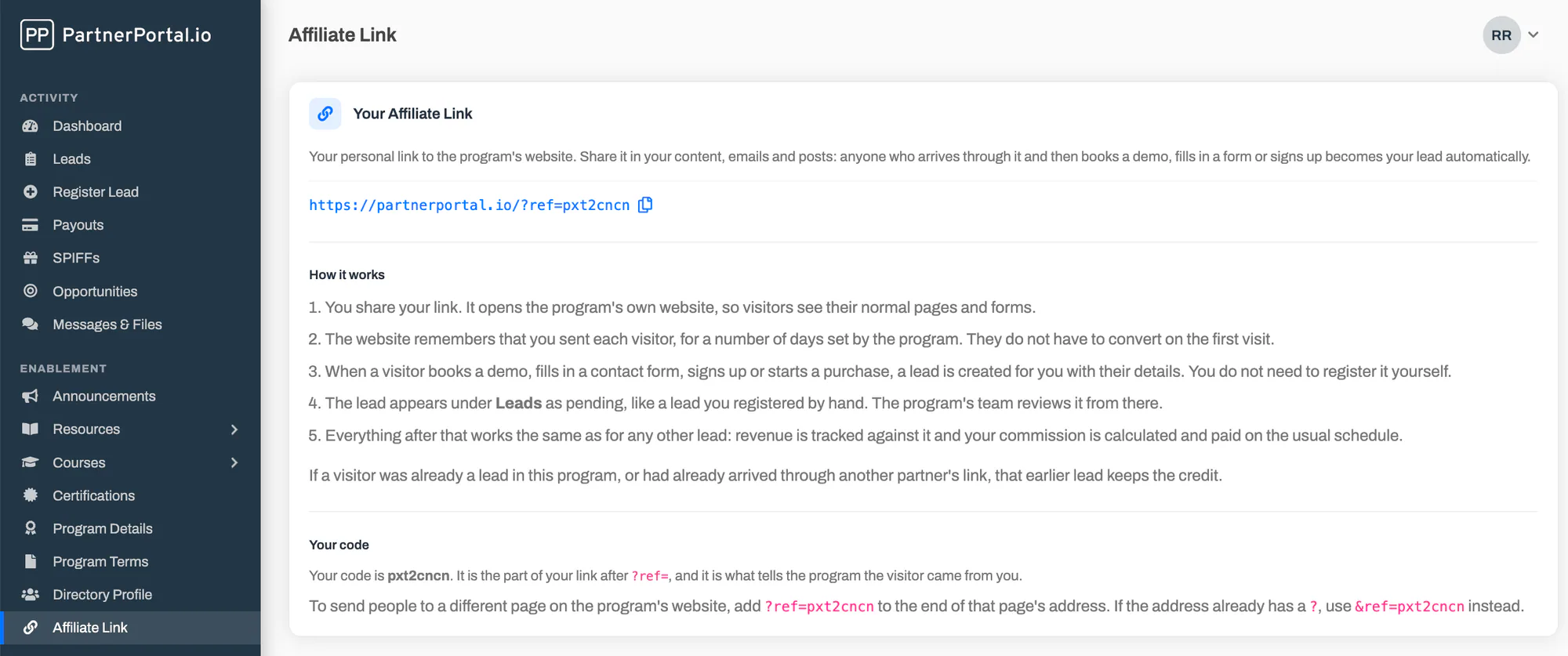
PartnerPortal — a partner relationship management (PRM) platform — is now a PRM with affiliate linking built in. Every partner in your program gets a personal link to your website. When someone who arrives through that link books a demo, fills in a form, or signs up, PartnerPortal creates a lead credited to that partner automatically. From that point on it is an ordinary lead: your team approves it, revenue attaches to it, and commissions calculate and pay exactly as they do for leads partners register by hand.
This is for the partners who send traffic rather than register deals — affiliates, content partners, communities, and the referral partners who tell a prospect about you but never get around to filling in a form. Now you can credit them automatically, in the same system you already use to run the rest of your program.
Why affiliate linking belongs in your PRM
Affiliate tracking is usually a separate tool, and for a self-serve consumer product that is fine. B2B is different: the person who clicks rarely buys on the spot. They request a demo or start a trial, your team follows up, and the deal closes weeks or months later through your pipeline. Most affiliate tools fire on a purchase, so a contact-form submission that becomes revenue next quarter never registers as a conversion — and the partner who sourced it never gets credit.
Building affiliate links into the PRM fixes that. The conversion is a lead, recorded the moment the visitor identifies themselves, and that lead runs through the same pipeline, duplicate detection, and commission logic as every other partner-sourced deal. There is no second system to reconcile and no attribution stranded in a browser cookie. (For the longer version — how B2B affiliate marketing differs from the consumer kind, and what to look for in a tool — see our guide to B2B affiliate marketing.)
What affiliate links do
- Every partner gets a personal link. The owner and each team member at a partner get their own link — your website address with their code on the end, like
https://www.example.com/?ref=a1b2c3— with a copy button, ready to share on their site, in a newsletter, or in a message to a prospect. - One small script on your site does the tracking. You add a single tag once. It loads in the background, never slows a page or a form, and remembers who referred each visitor in a first-party cookie on your domain.
- Conversions can be a form, a signup, or a checkout. Mark a demo or contact form with one attribute and you are done — no code. Signups and checkouts are a single function call from your own code. Use any mix of the three.
- Attribution is lead-first. A conversion creates a pending lead credited to the referring partner, carrying that partner’s commission settings, with Affiliate Link shown as its origin. It is never auto-synced to your CRM — you approve it like any other lead.
- The first referrer keeps the credit. If a lead already exists for that prospect, the existing partner keeps it, and your normal duplicate detection flags company-level matches for review. Partners do not end up fighting over the same prospect.
- A long, adjustable credit window. 90 days by default, up to 365, so a slower B2B buyer who returns later is still credited to the partner who introduced them.
- Everything downstream is normal. Once the lead exists, affiliate links stop being special. Revenue attaches through your connected Stripe, QuickBooks, or Xero account, a CSV import, a webhook, or a manual entry, and when the deal is won, commissions are included in payouts on your usual schedule.
Partners see their own results
Turn affiliate links on and each partner gets an Affiliate Link entry in their portal menu with their link, a copy button, and their code — and a running view of their own results: visits, leads, and conversion rate, month by month. You get the same across the whole program, ranked by partner and over time, so you can see which partners actually send business rather than just clicks. The numbers come from the visits PartnerPortal records, so there is nothing to set up.
Setting it up
Getting affiliate links live takes a few minutes:
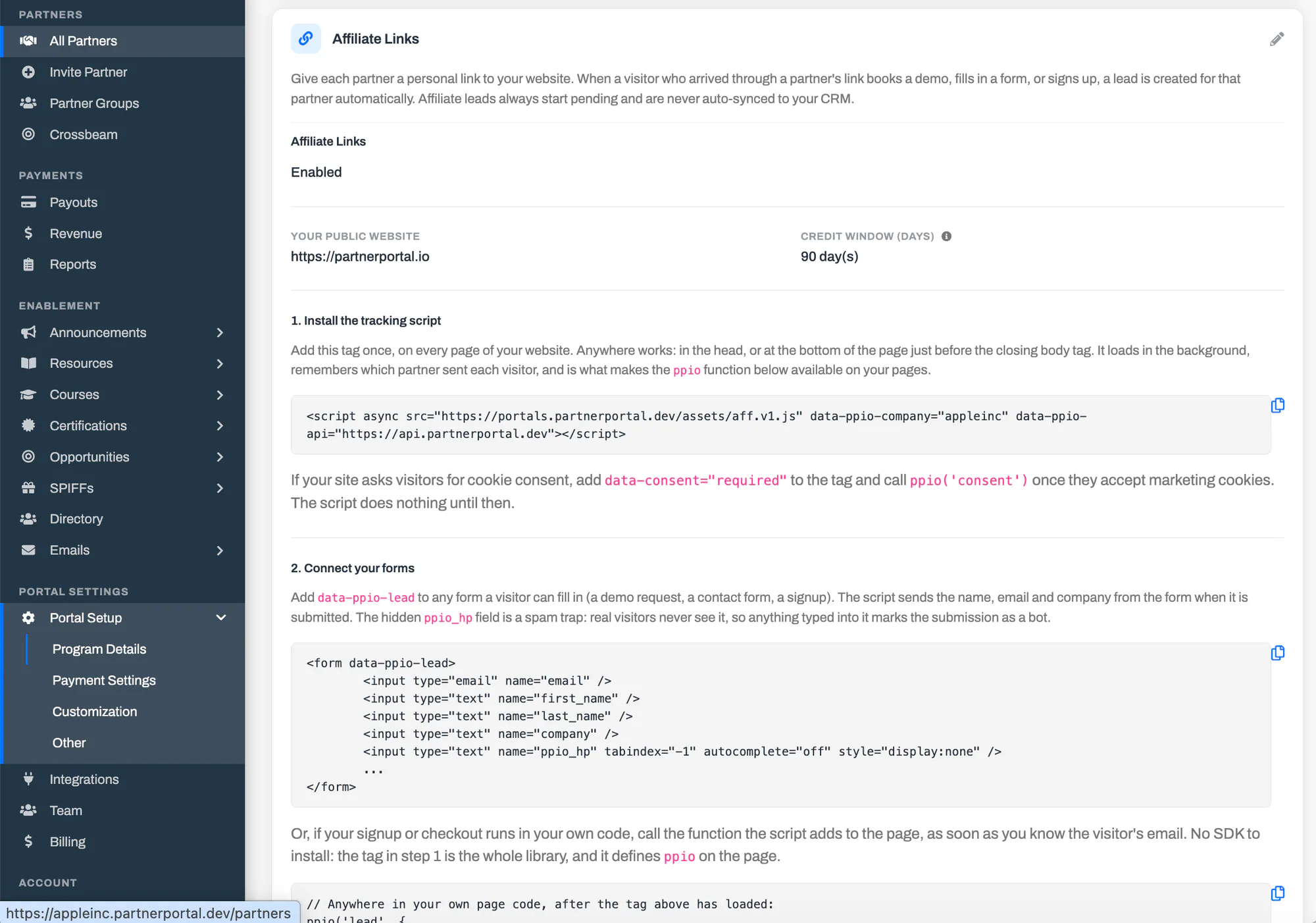
- Open Enablement → Affiliate Links, click Edit, turn it on, and enter your public website address.
- Set your credit window — how long after a click a conversion is still credited. 90 days suits most programs.
- Copy the tracking script from the card and add it to every page of your site, or through your tag manager.
- Connect your forms — mark a demo or contact form with one attribute, hidden field, or CSS class, and PartnerPortal maps its fields to your lead fields automatically.
For the full walkthrough — connecting forms, mapping lead fields, sending conversions from your own code, and testing your install — see the affiliate links documentation.
Who it’s for
Any PartnerPortal customer whose partners send traffic: affiliates and content partners, communities and newsletters, and referral partners who would rather share a link than register a deal. It is especially useful if you have been losing credit for partner-driven signups because there was no way to attribute them, or if you want to run affiliate, referral, and reseller partners together without a second tool and a second set of numbers.
Getting started
If you are already a customer, open Enablement → Affiliate Links to turn it on. If you are evaluating PartnerPortal as the PRM for your partner program, you can launch a free portal at partnerportal.io and try affiliate links alongside everything else — they are included on every plan, including the free tier.
As always, if there is an affiliate workflow you would like to see, we want to hear about it.
Frequently asked questions
Does PartnerPortal have affiliate links?
Yes. PartnerPortal now includes built-in affiliate links. Every partner user gets a personal link to your website, and when someone who arrived through that link books a demo, submits a form, or signs up, PartnerPortal creates a lead credited to that partner automatically. From there the lead is ordinary: you approve it, revenue attaches to it, and commissions calculate and pay as they do for any other lead. Affiliate links are included on every plan, including the free tier.
What is a PRM with affiliate linking?
A PRM (partner relationship management platform) with affiliate linking lets you run an affiliate motion inside the same system you use for the rest of your partner program. Rather than bolting a separate affiliate tool onto your PRM, each partner gets a tracked link, a referred conversion becomes an attributed lead, and that lead flows through the same pipeline, deal protection, and commission logic as your referral and reseller partners. PartnerPortal is a PRM with built-in affiliate linking, so affiliate, referral, and reseller partners all live in one place.
How does affiliate attribution work for a longer B2B sale?
PartnerPortal is lead-first rather than sale-first. The referral is recorded the moment a visitor converts — a form, a signup, or a checkout — and a lead is created and credited to the partner right then, so the attribution does not depend on a browser cookie surviving all the way to a sale that may close months later. The credit window is 90 days by default and can be set up to 365, so a visitor who comes back later is still credited to the same partner.
Who gets credit if two partners refer the same company?
The first partner to refer a prospect keeps the credit. If a visitor clicks a second partner's link while an earlier referral is still active, the earlier referral stands, and if a lead already exists for that email the partner on the existing lead keeps it. Your normal duplicate-lead detection still runs on company matches, so an affiliate lead for a company another partner already registered is flagged for your review like any other duplicate.
What counts as a conversion?
Any moment a visitor identifies themselves. PartnerPortal supports three kinds and you can use any mix: a form submission (a demo request, contact form, or newsletter signup — marked with one attribute, no code), a product signup, or a checkout. Marking a form needs no engineering; signups and checkouts are a single function call from your own code.
Do affiliate leads sync to my CRM automatically?
No. Affiliate leads always start pending in your default lead phase and are never auto-synced to your CRM, even if your portal auto-approves other leads. You review each one and decide what happens next, exactly as you would for any pending lead. They show 'Affiliate Link' as their origin so your team can tell them apart.