
What Is a Partner Portal? A Complete Guide
A partner portal is a branded platform where your partners register deals, find resources, and get paid. Here is what it is, how it works, and what to look for.
Written by the team at PartnerPortal — PRM software used to run B2B partner and channel programs.
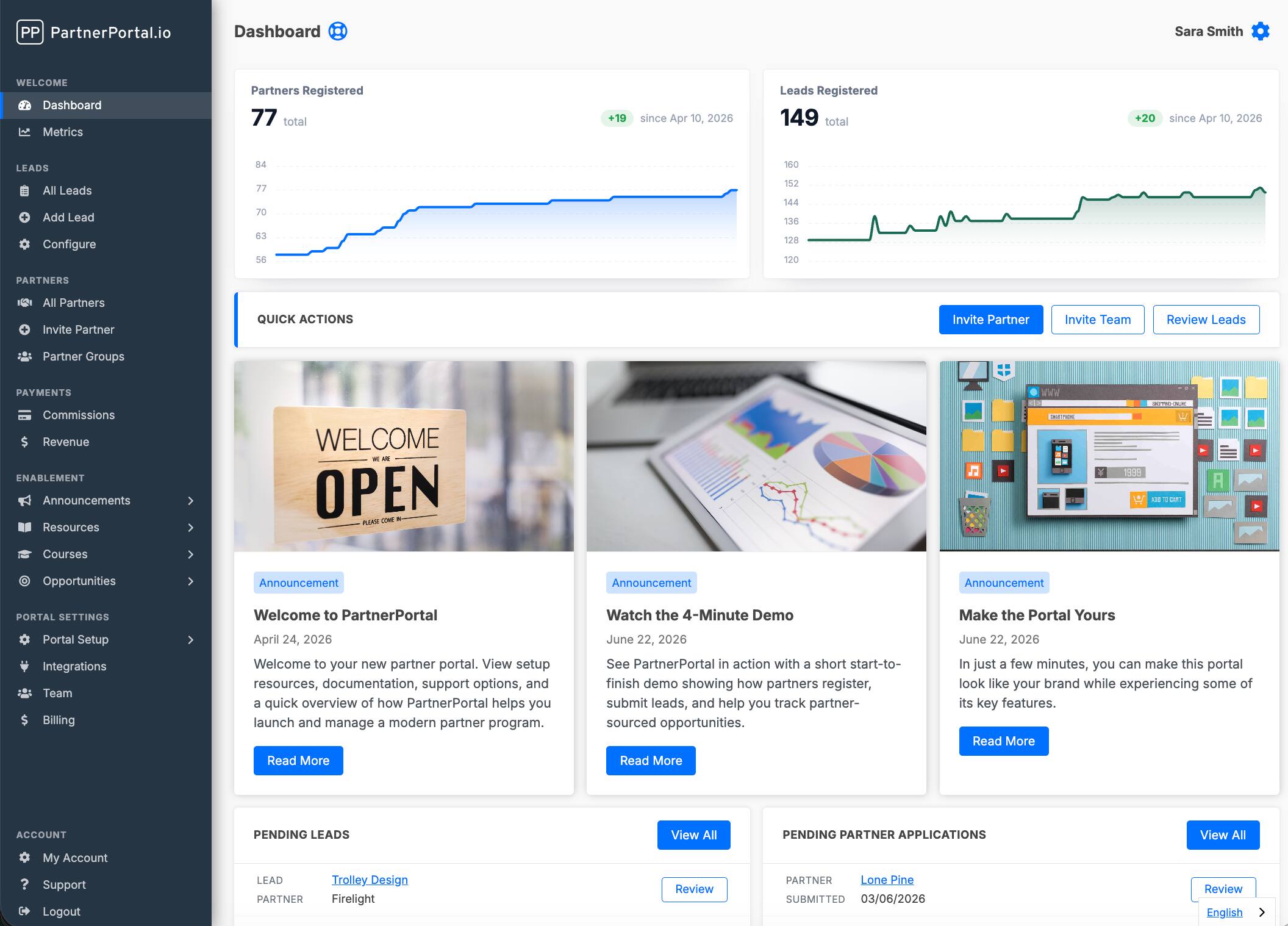
A partner portal is a dedicated, branded platform where a company’s partners — resellers, referral partners, affiliates, and channel partners — log in to register deals, access sales and marketing resources, track their leads, and get paid. It’s the single place a partner goes to do business with you, the same way your sales team has a CRM to do their work.
If you’re running a partner program out of a shared spreadsheet, a folder of PDFs, and a long email thread, a partner portal is the system that replaces all three. This guide explains what a partner portal is, what it actually does, who uses one, how it differs from a CRM and from a full PRM, and what to look for if you’re evaluating one.
TL;DR: A partner portal is a branded, secure web platform where a company’s external partners — resellers, referral partners, affiliates, and channel partners — log in to register deals, access sales and marketing resources, complete training, communicate, and track commissions. It is the partner-facing counterpart to a CRM: where a CRM serves a company’s direct sales team, a partner portal serves its partners, and it synchronizes partner-registered leads and deals with the company’s CRM. The portal is the front-end interface; a partner relationship management (PRM) platform is the broader system that operates it.
What a partner portal is
A partner portal is a secure, branded web application built for the people who sell, refer, or resell your product but don’t work for you. Your customers get a website and your sales reps get a CRM; your partners get a partner portal.
The word “portal” matters. Unlike a static partner-program landing page — which is a marketing page that explains your program and invites people to apply — a partner portal is a logged-in environment where real work happens after someone joins. A partner signs in and sees their own deals, their own commissions, the resources they’re allowed to access, and a way to submit new business. Everything is scoped to that partner: two partners logging into the same portal can see completely different resources, tiers, and numbers.
A portal is also distinct from a partner directory, the public page where customers browse and contact your partners. Many portals can publish one, but the portal itself is private.
A good partner portal is white-labeled, so it feels like an extension of your brand rather than a third-party tool your partners are forced to tolerate. It typically lives on your own subdomain (for example, partners.yourcompany.com), carries your logo and colors, and reads as your portal — not the software vendor’s.
What a partner portal does
A partner portal handles the core partner workflow in one place: deal and lead registration, resource sharing, partner onboarding, training, communication, commission tracking, CRM synchronization, and reporting. Most partner portals cover these same core jobs; the depth varies by tool, but the functional shape is consistent:
- Deal and lead registration. Partners submit the opportunities they’re working through a structured form, so every partner-sourced deal is tracked, credited to the right partner, and protected from channel conflict. This is the feature most programs can’t run without.
- Resource and content sharing. A permission-based library of sales collateral, battle cards, logos, documentation, and videos — so partners can find what they need without emailing your team for the same files over and over.
- Partner onboarding. Branded signup, application approval, and guided first steps so a new partner can get from “interested” to “active” without a series of manual handoffs.
- Training and enablement. Increasingly, portals include courses and training paths so partners learn your product and sell it competently — sometimes replacing a separate learning management system (LMS).
- Communication. Announcements, updates, and deal-level comments that keep partners informed and give you a natural co-selling channel.
- Commission tracking and payouts. Visibility into what a partner has earned, and — in the better tools — the ability to calculate and pay commissions without exporting to a spreadsheet.
- CRM synchronization. The portal pushes partner-registered leads and deals into your CRM (HubSpot, Salesforce, Pipedrive, Zoho, and others) so your sales team works where they already work, and pulls status back so partners can follow a deal’s progress.
- Reporting. A view of partner-sourced pipeline and revenue, partner activity, and program performance.
The two sides: partners and your team
A partner portal is really two connected experiences sharing one system.
The partner-facing side is what your partners see when they log in: their dashboard, the deals they’ve registered, the resources they can access, their training, and their earnings. This side has to be genuinely easy to use — partners don’t have to use your portal, and if it’s confusing, they’ll fall back to email and the whole point is lost.
The admin (operator) side is what your team uses to run the program: approving partners and deals, organizing resources into permission groups, configuring commission rules and tiers, managing the CRM integration, and reviewing performance. This side has to be powerful enough to manage the program at scale without becoming a full-time manual job.
The best portals make both sides strong at once. A portal that delights partners but forces your team into spreadsheet exports has only solved half the problem — and vice versa.
Who uses a partner portal
Partner portals are used by companies that generate revenue through other companies — most commonly B2B software, but also manufacturing, financial services, agencies, and any business running a formal channel. The common thread is a partner program with enough partners that managing them by hand has stopped working.
Typical signs a company is ready for one:
- You have more than a handful of partners and can no longer remember who registered which deal.
- Partners are asking where to find resources, or how to submit a lead, or when they’ll get paid.
- Commission calculation has become a recurring, error-prone chore.
- You want partners to self-serve — onboard, register deals, and find materials — without routing everything through a person.
The role that owns the portal is usually a partnerships or channel lead: a Director of Partnerships, a partner manager, or, at smaller companies, a founder or head of sales wearing the partnerships hat.
Partner portal vs. CRM
A partner portal and a CRM serve different users: a CRM is built for your direct sales team, while a partner portal is built for your external partners. It’s the most common point of confusion in the category, and the distinction is simple once you see it.
| CRM | Partner portal | |
|---|---|---|
| Primary users | Your internal sales reps | Your external partners |
| Purpose | Manage the company’s own pipeline | Let partners register deals, access resources, and get paid |
| Who logs in | Employees | Partners (and your program admins) |
| Data scoping | Reps see the team’s pipeline | Each partner sees only their own deals and permitted resources |
| Typical examples | HubSpot, Salesforce, Pipedrive | A dedicated partner portal that syncs into those CRMs |
You don’t replace your CRM with a partner portal. The two work together: partner-registered leads flow from the portal into your CRM automatically, so your sales team keeps working where they already do, while partners get an environment built for how they work.
Partner portal vs. PRM
A partner portal is the partner-facing front end where partners log in; a PRM (partner relationship management) platform is the broader system behind it — the operator workflows, the CRM integration, the commission engine, the reporting, and the automation that make the portal work. The portal is the visible part; the PRM is the whole machine. The two terms are often used interchangeably, but they describe different layers of the same product.
| Partner portal | PRM | |
|---|---|---|
| What it is | The partner-facing interface partners log into | The complete system that runs the partner program |
| Scope | Dashboard, deals, resources, training, commissions | The portal plus operator workflows, CRM sync, commission engine, reporting, and automation |
| Analogy | The screen partners see | The engine behind the screen |
| Relationship | One component of a PRM | Includes the partner portal |
In practice, most modern tools are both — they give you a branded partner portal and the PRM system that runs it. The distinction matters mainly when you’re comparing tools: some “CRM-first” PRMs deliberately minimize the portal in favor of delivering everything through Slack, Teams, or email, on the theory that partners won’t reliably log into a portal. Whether that fits depends on your partners. If they’ll use a portal, a portal-based approach gives them a real home; if they won’t, off-portal delivery can work better.
For the full picture of the category — how PRM tools compare, what they cost, and who each is for — see our guide to the best PRM software. If price is the deciding factor, we also rank the most affordable PRM software.
Key features to look for
Not every program needs every feature, but this is the checklist worth evaluating against:
- Native CRM integration. Confirm it’s a true two-way native sync with your CRM — not a one-way export or a Zapier hop. Ask which objects sync and in which direction.
- Deal / lead registration that matches how you actually sell, with clear attribution and conflict handling.
- Permission-based resource sharing so different partner types and tiers see different content.
- Branding and white-labeling — your logo, colors, and domain, so the portal is an extension of your brand.
- Commission and payout handling flexible enough for your model (flat or percentage, one-time or recurring, tiers).
- Onboarding and enablement, ideally including training and courses, so partners get productive quickly.
- Reporting on partner-sourced pipeline and revenue, not just activity counts.
- Time to launch. The strongest modern portals go live in minutes with no implementation project; legacy enterprise platforms can take weeks or months.
- Pricing that fits your stage — including whether there’s a genuinely free tier to start, rather than a time-limited trial.
Why a partner portal beats spreadsheets and email
A partner portal beats spreadsheets and email because it centralizes partner data, automates the manual work, and lets partners self-serve — none of which scales in a shared sheet and an inbox. Almost every partner program starts in a spreadsheet, and almost every growing one outgrows it. A partner portal replaces the manual stack — the shared sheet, the resource folder, the email threads, the commission calculations — with one system, and the payoff shows up in a few concrete ways:
- Less admin. Deal registration, resource requests, and payout calculations that used to be manual become self-serve or automated. Teams routinely report cutting the equivalent of a full role’s worth of busywork.
- More partner engagement. Partners with a clear place to register deals, find materials, and see their earnings stay active between deals instead of going quiet.
- Cleaner attribution. Every partner-sourced deal is tracked and credited automatically, which makes reporting trustworthy and commissions fair.
- A channel you own. A working portal turns a loose collection of partners into a repeatable, revenue-generating channel — one that compounds instead of depending on the founder’s memory.
The honest caveat: a portal is a tool, not a strategy. It removes the operational drag that kills programs, but it won’t recruit good partners or design a compelling offer for you. It makes a good program scalable; it doesn’t make a bad one good.
How to launch a partner portal
You no longer need a multi-quarter implementation to stand one up. With a modern partner portal, you can launch a branded portal in about 60 seconds, connect your CRM so partner leads flow into it automatically, invite your first partners, and start registering deals the same day — often on a free tier, before committing any budget.
A sensible sequence:
- Launch the portal and apply your branding.
- Connect your CRM so partner-registered deals sync to the pipeline your sales team already uses.
- Load your resources and organize them into permission groups by partner type or tier.
- Invite partners and set up your deal-registration form.
- Configure commissions so payouts are calculated automatically.
From there, the work shifts from operations to growth: recruiting the right partners, enabling them well, and measuring what the channel returns.
Related reading
- Best PRM software in 2026 — the full category compared
- Most affordable PRM software — ranked by real cost
- What is a partner directory? — the public, buyer-facing page that sits alongside the private portal
- What is channel management? — the broader discipline a portal supports
- Deal registration and the resource center — two core portal features up close
- Launch your own partner portal — see the product
Frequently asked questions
Is a partner portal the same as a PRM?
Not exactly. A partner portal is the partner-facing front end where partners log in. A PRM (partner relationship management) platform is the broader system behind it, including operator workflows, CRM integration, commissions, and reporting. Most modern tools provide both.
Is a partner portal the same as a partner-program page?
No. A partner-program page is a public marketing page that explains your program and invites people to apply. A partner portal is the logged-in environment where partners do actual work — registering deals, finding resources, and tracking earnings — after they join.
Do I need a CRM as well as a partner portal?
Usually yes. A CRM runs your direct sales; a partner portal runs your partners. The two integrate — partner-registered leads sync from the portal into your CRM — rather than replacing each other.
Can I build a partner portal myself?
You can, but it's rarely worth it. A homegrown portal means building and maintaining authentication, permissions, CRM sync, commission logic, and reporting yourself. Purpose-built partner portals provide all of that out of the box and launch in minutes.
Is there a free partner portal?
Yes. Some tools — PartnerPortal among them — offer a genuinely free tier (not a time-limited trial) so you can launch a real branded portal and run a live program without paying, then upgrade as the program grows.
How long does it take to set up a partner portal?
With modern tools, a basic branded portal can be live in minutes and fully configured (CRM connected, resources loaded, partners invited) within a day. Legacy enterprise platforms are the exception and can take weeks or months.